


Windows 10 reached EOS (end of support) on October 14, 2025. If you are on Windows 10, see this article.

Hilfe durchsuchen

Vorsicht vor Support-Betrug: Wir fordern Sie niemals auf, eine Telefonnummer anzurufen, eine SMS an eine Telefonnummer zu senden oder persönliche Daten preiszugeben. Bitte melden Sie verdächtige Aktivitäten über die Funktion „Missbrauch melden“.

Weitere Informationen

all emails disappeared

  • 2 Antworten
  • 0 haben dieses Problem
  • 87 Aufrufe
  • Letzte Antwort von Toad-Hall

I have 2 problems.

1. I moved all my inbox emails to a sub-folder, the folder says it contains 290 emails with 3 unread emails NONE are showing. I went to Alt View and the option to show all emails but that has not changed anything. What is going on????

2. I moved my website to another host, set all my emails again and then connected thunderbird with imap settings, and all the emails in my thunderbird desktop account vanished.

I have 2 problems. 1. I moved all my inbox emails to a sub-folder, the folder says it contains 290 emails with 3 unread emails NONE are showing. I went to Alt View and the option to show all emails but that has not changed anything. What is going on???? 2. I moved my website to another host, set all my emails again and then connected thunderbird with imap settings, and all the emails in my thunderbird desktop account vanished.

Alle Antworten (2)

I have a screenshot from the above question I forgot to attach
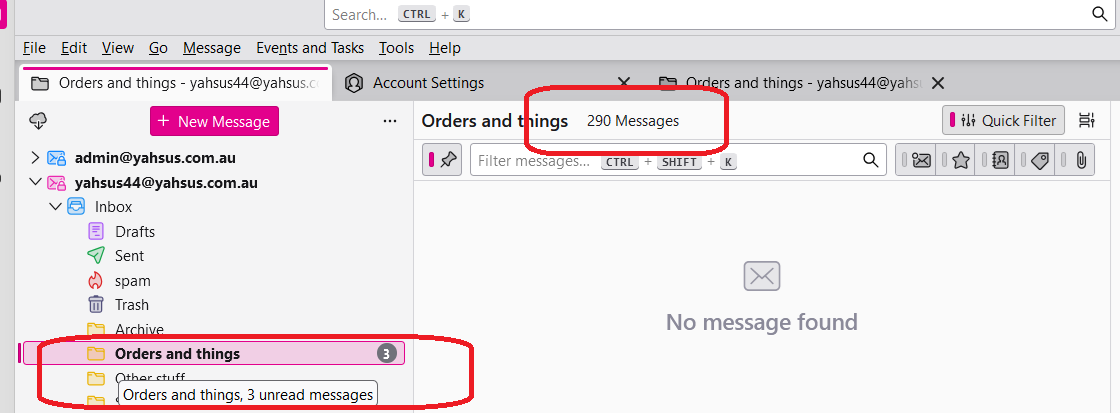
If you look at your 'Quick Filter' toolbar, you will see you have the 'pin' icon enabled - it has a pink strip of colour. That means you have pinned a filter used elsewhere to apply to all folders. So the selected folder has a filter being applied. Click on the 'pin' icon to remove the filter.