


My mailbox split in two after updating. How can I reintegrate?

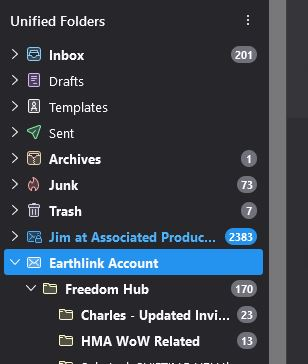
When I updated to the latest Thunderbird, two of my emails accounts and subfolders were fine. One, my earthlink account, "split" in two. My inbox, drafts, junk, and a few other folders are ABOVE the Earthlink account header, and my specific Earthlink subfolders are below it.
Is there any way to put my account back together? Thanks. (See screen shot)
When I updated to the latest Thunderbird, two of my emails accounts and subfolders were fine. One, my earthlink account, "split" in two. My inbox, drafts, junk, and a few other folders are ABOVE the Earthlink account header, and my specific Earthlink subfolders are below it.
Is there any way to put my account back together? Thanks. (See screen shot)
Alle Antworten (3)
The unified folders area only accounts for folders that exist in accounts and have the same name, such as Sent. The folders that appear below, under the account name, are folders whose names are unique to that account. If you invoke the "All Folders" option, you will see all folders together.
Got it! Thank you so much, David. :)
You are very welcome.