


Windows 10 reached EOS (end of support) on October 14, 2025. If you are on Windows 10, see this article.

Hilfe durchsuchen

Vorsicht vor Support-Betrug: Wir fordern Sie niemals auf, eine Telefonnummer anzurufen, eine SMS an eine Telefonnummer zu senden oder persönliche Daten preiszugeben. Bitte melden Sie verdächtige Aktivitäten über die Funktion „Missbrauch melden“.

Weitere Informationen

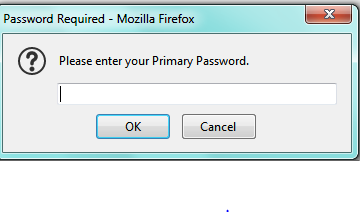
Password Required - Mozilla Firefox pop up

  • 1 Antwort
  • 1 hat dieses Problem
  • 112 Aufrufe
  • Letzte Antwort von gtclark1
  • Archiviert

When I open my Yahoo browser I get a pop up asking for my "Primary password". I checked in the Task Manager and it is present as Firefox that when I end that task then the popup goes away. I am already signed in to my Firefox Acct. I screenshot the popup below. It will return several time even if I "X" out or hit cancel. There is no other information no matter where I click on that box. I do not put any passwords in the box for fear of scam/virus/spoof ETC.
When I open my Yahoo browser I get a pop up asking for my "Primary password". I checked in the Task Manager and it is present as Firefox that when I end that task then the popup goes away. I am already signed in to my Firefox Acct. I screenshot the popup below. It will return several time even if I "X" out or hit cancel. There is no other information no matter where I click on that box. I do not put any passwords in the box for fear of scam/virus/spoof ETC.
Angefügte Screenshots

Alle Antworten (1)

I would avoid that because you are correct, it looks suspicious. Under preferences, there is a way to set your primary password which looks nothing like that dialog box. This link https://support.mozilla.org/en-US/kb/use-primary-password-protect-stored-logins walks you through that process. Try to set your primary password that way and see if that still pops up. If it does I would download and turn on add block to minimize the number of pop-ups.