


I need to show sender email address in display columns.
I need to show the senders email address in the list of columns displayed. I have already unchecked the box in Tools--Options-Display-Advanced [to show only display names]. I have also already been using the Show Address Only plugin which worked for many version of Thunderbird, but it no longer works. [I'm using Windows 10 x64, Thunderbird latest 68.6.0 x32] I sent an email to the developer [in Russia?] today asking if he is going to be updating it to support versions 68.0.* +. However, I really think this should be a feature in EVERY email client. It is an aspect of 'email.' Anyway, I do thank you for such a great plugin regardless and hope my suggestion/request raises a discussion somewhere :). P.s. Just realized this is going to community, not the staff necessarily so just pretend you're hired for a few min. :P
If I missed a way in settings to make this happen currently, my apologies, and please let me know how.
Thanks again!
Ausgewählte Lösung
Yes, I have 0.2.0 installed.
Oh and my thanks in the original message was for Thunderbird (whoops!) I thanked the plugin dev in my question/email.
WOW! I seriously have no idea why, but it now working. I seriousnt didnt change a thing! Thanks for the vibe sfhowes. Hahaah wow!
Hopefully it stays working. :P
Diese Antwort im Kontext lesen 👍 0Alle Antworten (5)
Do you have version 0.2.0 of Show Address Only?
Ausgewählte Lösung
Yes, I have 0.2.0 installed.
Oh and my thanks in the original message was for Thunderbird (whoops!) I thanked the plugin dev in my question/email.
WOW! I seriously have no idea why, but it now working. I seriousnt didnt change a thing! Thanks for the vibe sfhowes. Hahaah wow!
Hopefully it stays working. :P
Geändert am von amirand926
The add-on works here in 68.6 (see picture). Maybe you had the Unified folder view, where it doesn't work.
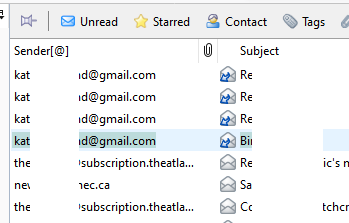
Yea, it seems to have suddenly start working. The Sender[@] column was completely blank for every email in my inbox. That was all day today until about 30 min ago. Go figure. Maybe there was a conflict w a running plugin or something, Idk. Thanks again for the help.
This should not be an add-on but a standard feature of Thunderbird since scam/phishing/etc. mails are not declining but increasing in number. Relying on a single add-on developer to keep Thunderbird safe is not a valid solution.