


Windows 10 reached EOS (end of support) on October 14, 2025. If you are on Windows 10, see this article.

Hilfe durchsuchen

Vorsicht vor Support-Betrug: Wir fordern Sie niemals auf, eine Telefonnummer anzurufen, eine SMS an eine Telefonnummer zu senden oder persönliche Daten preiszugeben. Bitte melden Sie verdächtige Aktivitäten über die Funktion „Missbrauch melden“.

Weitere Informationen
Archiviert

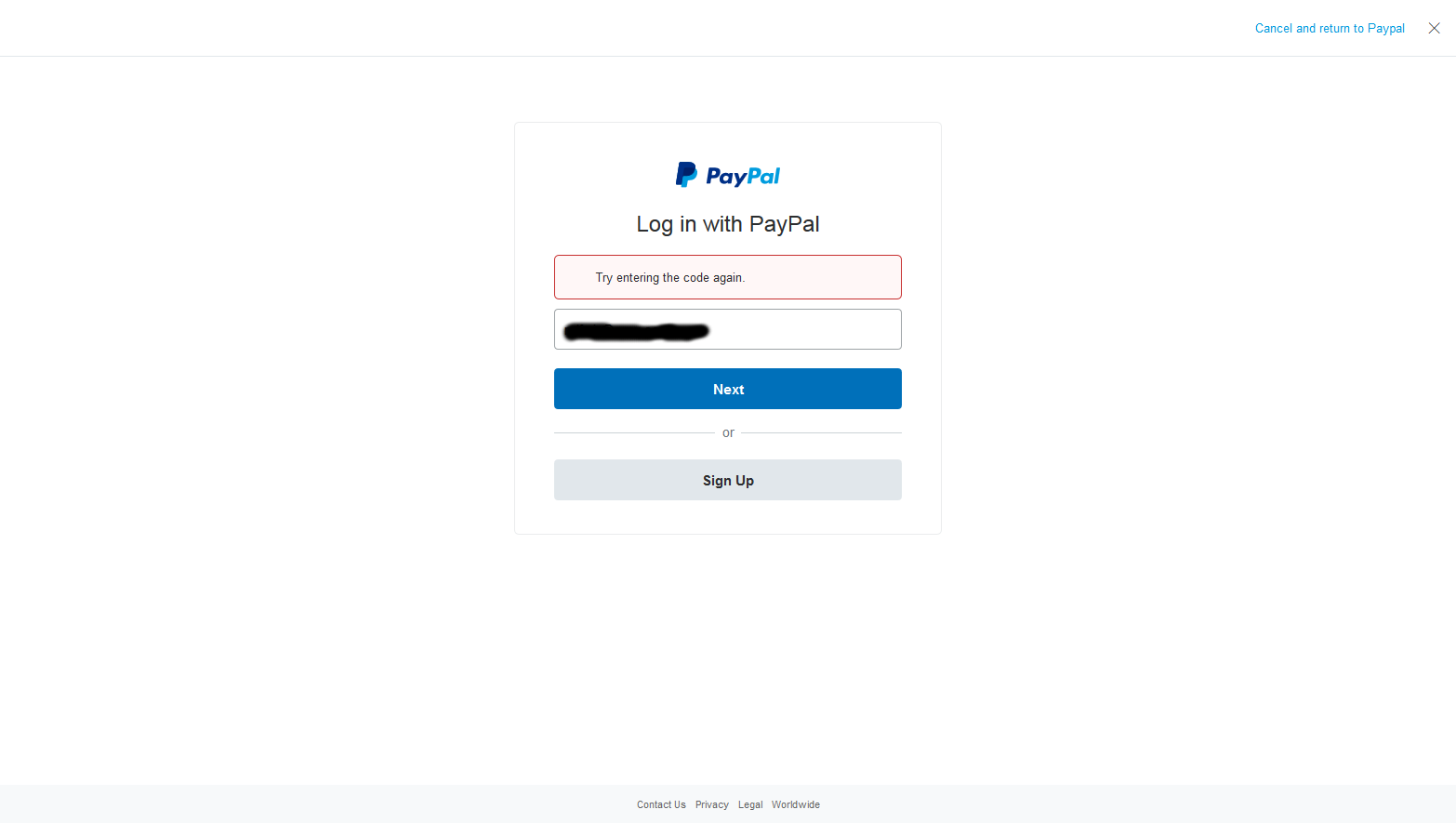
Can't login to Paypal.com - "Try entering the code again."

WillW

This problem started a few weeks ago. When trying to login to Paypal.com, there is supposed to be a "code box" image on the login screen that you have to type in to prove you're not a bot. But on Firefox that box is not showing up (see attached image).

I have disabled all my third-party add-ons that relate to privacy, cookies, or adblocking, but it hasn't fixed the issue.

When I click on the Site Information box next to Firefox's address bar, it shows that the only blockable content on this page are third party cookies from "www.paypalobjects.com" and "ak1s.abmr.net," both of which are set to "allow for session" by me in Firefox's settings. First-party cookies are all allowed.

In Firefox's settings, I have the following options:

Trackers - Blocked only in private windows (Level 1)

Cookies - Third-party trackers blocked

Cryptominers - Blocked

Fingerprinters - Blocked

So now I'm stuck and don't understand what the problem is. Can anyone help me?

I am using Windows 7 Pro SP1 64-bit and Firefox 68.0.1 64-bit.
This problem started a few weeks ago. When trying to login to Paypal.com, there is supposed to be a "code box" image on the login screen that you have to type in to prove you're not a bot. But on Firefox that box is not showing up (see attached image). I have disabled all my third-party add-ons that relate to privacy, cookies, or adblocking, but it hasn't fixed the issue. When I click on the Site Information box next to Firefox's address bar, it shows that the only blockable content on this page are third party cookies from "www.paypalobjects.com" and "ak1s.abmr.net," both of which are set to "allow for session" by me in Firefox's settings. First-party cookies are all allowed. In Firefox's settings, I have the following options: Trackers - Blocked only in private windows (Level 1) Cookies - Third-party trackers blocked Cryptominers - Blocked Fingerprinters - Blocked So now I'm stuck and don't understand what the problem is. Can anyone help me? I am using Windows 7 Pro SP1 64-bit and Firefox 68.0.1 64-bit.
Angefügte Screenshots

Geändert am von WillW

Alle Antworten (1)

Use for PayPal another web-browser without all these settings.

Use VPN for this kind of websites.