


How do I set the date format with the new version of Thunderbird.

With the new version, Thunderbird no longer uses the date format set in Windows (7). How do I set my (European; dd-mm-yyyy) format?
Alle Antworten (8)
There is something in the release notes that mentions a new time adjustment. https://www.thunderbird.net/en-US/thunderbird/60.0/releasenotes/
Thanks. I must have overlooked it.
I am using 60.4.0 and the menu item quoted in the answer ("Tools > Options, Advanced, General") doesn't exist!
Any more ideas?
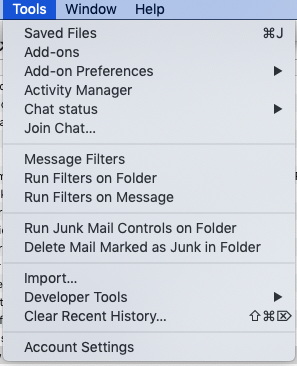
The command string you list is when using the Menu Bar in Windows. The Menu Bar is hidden in newer versions of Thunderbird. Pressing the alt key makes hidden Menu Bars appear if using Windows. If using the 3 bar AppMenu button, like you seem to be doing, Options is a choice in the main menu and not under Tools. If you are using a MAC the menu choices are different
Thanks @Airmail. I am using a Mac and I have eventually found command in Preferences>Advanced>General. Cheers

Thunderbird 60.4.0 (W10 Pro)
Unable to change the date format to dd/mm/yy. Have looked at the release notes, and followed/tried everything in this string.
Please can someone lead me through this in easy moves??
Regarding Airmail's post, at what point is the "alt" key used?
Many thanks for any help :-)
Hi FreddieD, I actually use a Mac so the menus are a bit different. However if you are using Windows I think you need: "Tools > Options, Advanced, General" then select whether date/time display will follow the application locale (adjusted by operating system's format settings for that locale) or the locale selected in the operating system's regional settings. Both of which are presumably the European format if that is where you are! Can't help with the "alt" key as I don't use Windows
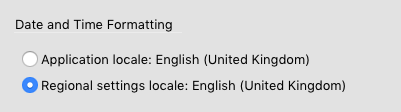
This is giving myself away, but it took me a bit to realize that the changed date setting doesn't take effect till after you've closed and reopened Thunderbird. (I had the same problem in reverse; all the dates were in European format, and I'm in the USA. You'd think that wouldn't be a problem, but I found it surprisingly disorienting!)