Dieses Thema wurde archiviert.
Bitte stellen Sie eine neue Frage, wenn Sie Hilfe benötigen.

Archiviert
Pocket new tab recommendations don't show up (and are not configurable)

Hi!
After a fresh install of Firefox Quantum, the Pocket recommendations don't show up in new tabs. This holds true for both "de" or "en-US" locales. I'm also missing the possibility to turn them on or off in the new tab settings.
My "Accept-Language" header delivers "en-US,de;q=0.5”. My system locale (MacOS Sierra) is "en_US.UTF-8".
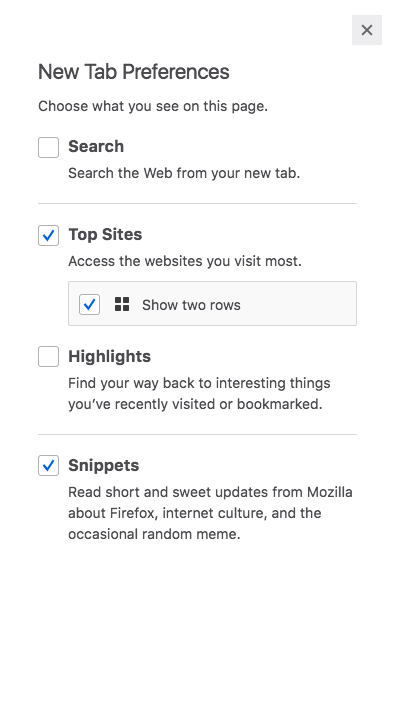
Attached is a screenshot of the new tab settings, missing the Pocket option.
Viewing my Pocket list via the Library icon works. I logged in using my newly created Firefox account.
Is there anything I'm obviously missing, or additional information I can provide to find a solution?
Thanks in advance, Jens
Hi!
After a fresh install of Firefox Quantum, the Pocket recommendations don't show up in new tabs. This holds true for both "de" or "en-US" locales. I'm also missing the possibility to turn them on or off in the new tab settings.
My "Accept-Language" header delivers "en-US,de;q=0.5”. My system locale (MacOS Sierra) is "en_US.UTF-8".
Attached is a screenshot of the new tab settings, missing the Pocket option.
Viewing my Pocket list via the Library icon works. I logged in using my newly created Firefox account.
Is there anything I'm obviously missing, or additional information I can provide to find a solution?
Thanks in advance,
Jens
Alle Antworten (1)
Forgot to attach the mentioned screenshot. Added here.