


Duplicate Certificate Authority Issuer names preventing message signing

Hello!
I've recently downloaded an app for my iPhone ("And You And I" https://itunes.apple.com/app/and-you-and-i/id717480794 , "AYAI" from here on) that generates S/MIME keys for email. My understanding is that the App also generates root Certificate Authority (CA) certificates for each set of keys to get around iOS's restrictions on using self-signed keys. The app generates a CA cert for each email cert/key pair, so for example my Fastmail and my Gmail mail keys will each have their own individual CA cert.
This configuration works fine on iOS but when I attempt to import more than one set of keys into Thunderbird (currently version 52.1.0), I'm unable to send messages signed or encrypted (in some circumstances; see below). I thought I had narrowed this behavior down to just being caused by multiple AYAI-generated CA certificates, meaning having my Fastmail personal key/certificate pair installed, and also having a the CA certificates for my Fastmail _and_ my Gmail mail installed prevented me from signing with my Fastmail certificate, with the error:
"Sending of the message failed. Unable to sign message. Please check that the certificates specified in Mail & Newsgroups Account Settings for this mail account are valid and trusted for mail."
However, when I installed both sets of personal keys and inspected them, I see the following in the certificate viewer (see attachment). Even though they're linked to two different email addresses, the primary heading in the certificate viewer's tree is identical. However, strangely, this depends on the order the personal keys are installed in, it seems. If I install "Fastmail then Gmail" I see the data falling under the Fastmail heading. If I install "Gmail then Fastmail" I see the data falling under the Gmail heading (2nd attachment).
To add more strangeness to this behavior. It seems to be _only_ my Fastmail address that is unable to send signed messages, no matter the order the personal keys are installed in. My Gmail address is capable of sending signed messages in every case I've tested, as long as I have at least my Gmail personal keypair and its corresponding root CA installed.
Unfortunately I don't have any other software capable of generating S/MIME certificates so I'm unable to check if this is limited to AYAI. I've emailed the author of the AYAI app who is attempting to follow up, but I was hoping to find in the meantime if there's any reason why this might happen when importing multiple sets of personal keys each with different email addresses but the same Common Name.
All of this was tested on my work computer. I'm in the process of trying to duplicate these tests on my home computer, and will follow up if the behavior does or does not persist there.
Please let me know if I can answer any more questions or provide more data.
Thank you!
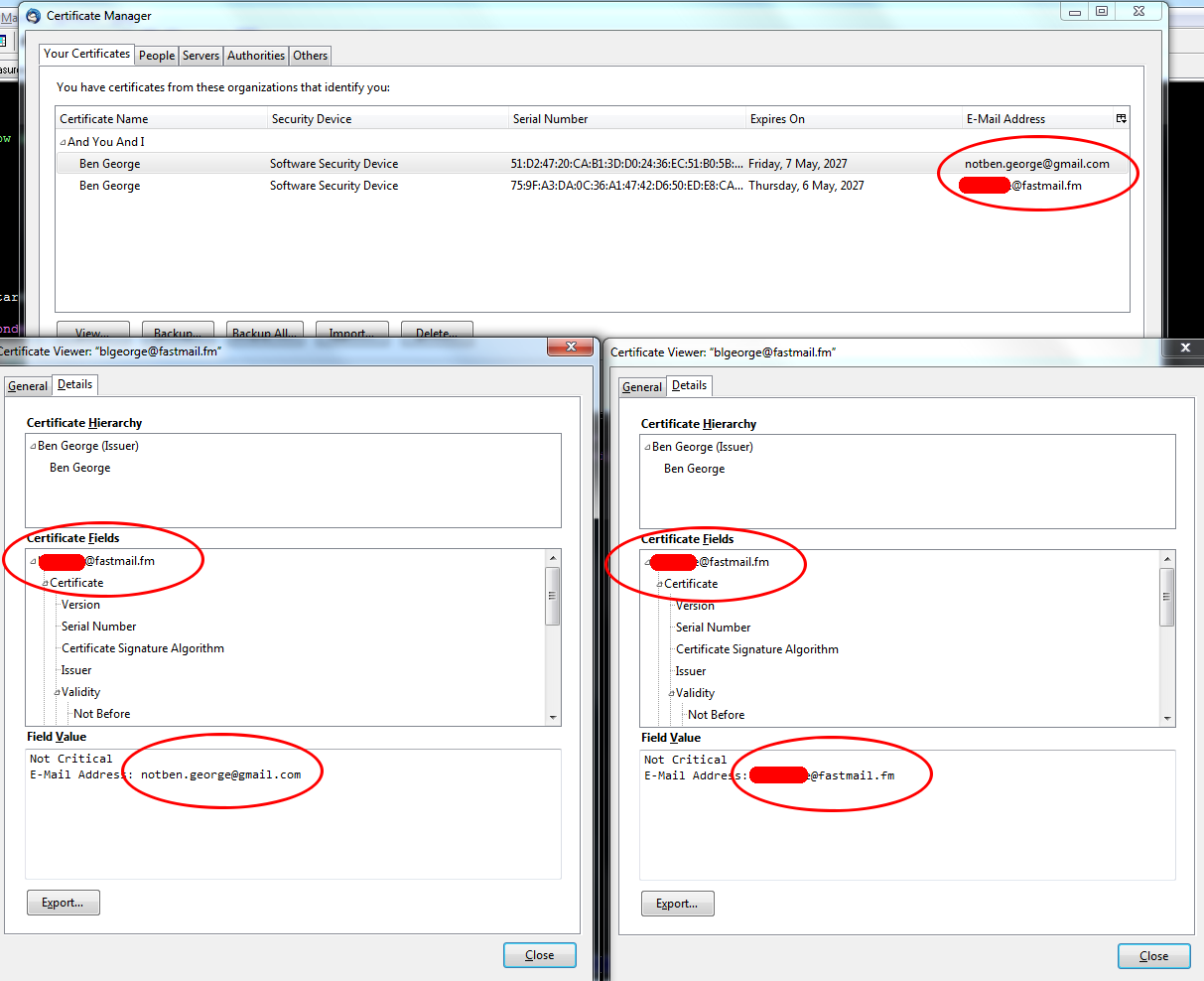
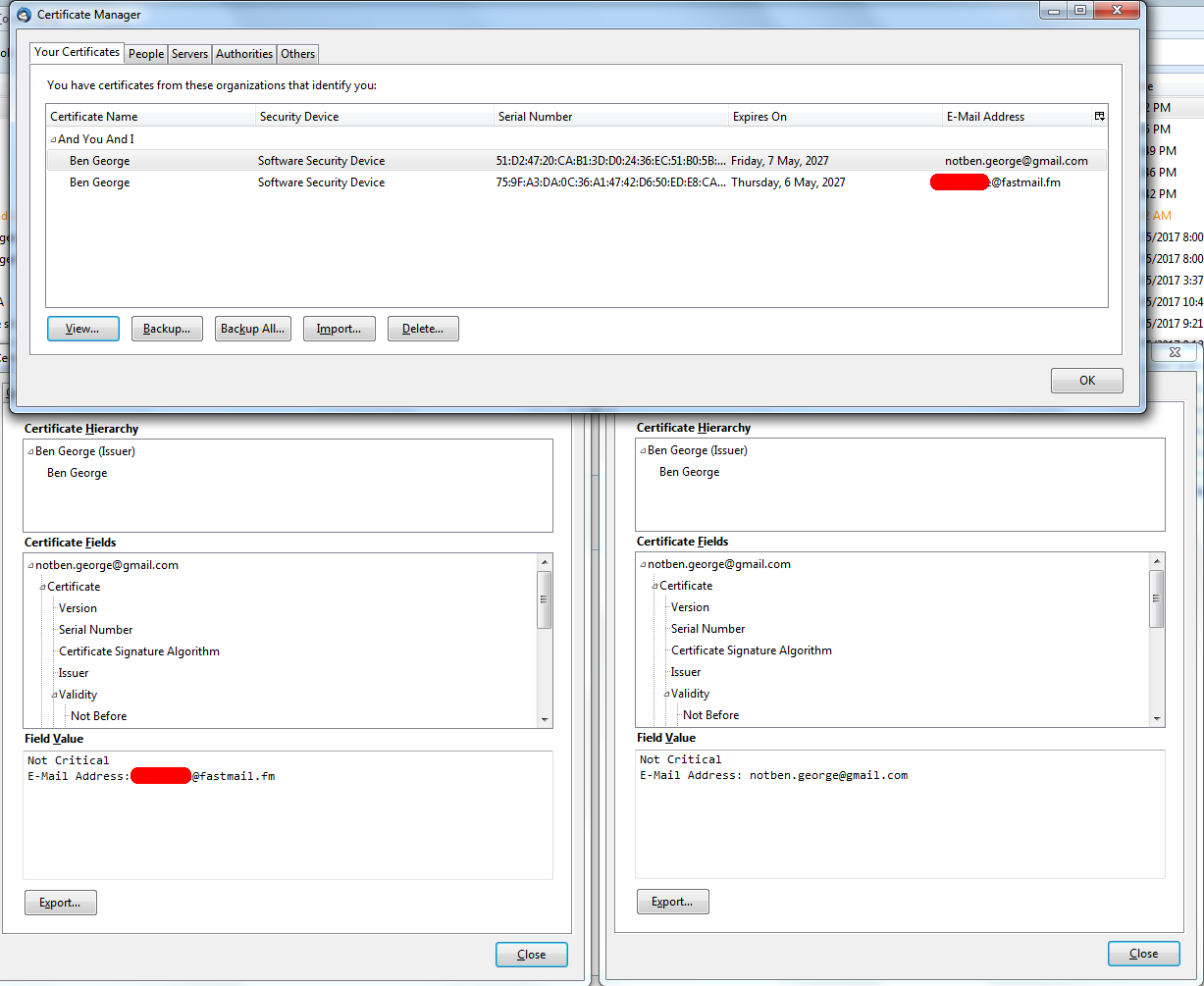
Alle Antworten (6)
I've managed to copy the "And You And I" files to my home computer (also running Thunderbird 52.1.0) and the behavior reproduces exactly:
1) Installing both .pfx files/both private keys results in the Certificate Viewer showing all of the details for both keys under the heading of whichever email's key was installed first. 2) If both CAs are installed, only the Gmail address will send signed messages. Attempts to send signed messages from the Fastmail account fails with the error mentioned in the post above. 3) Only if just the Fastmail key and its corresponding root CA are installed does signing and encrypting work properly.
I'm looking into using OpenSSL to generate keys to see if I can recreate this behavior with certificates not generated by the AYAI app. This may take some time as I'm not very familiar with this software.

Your screen shots don't provide enough context given how many years its been since I paid any attention to S/MIME. But its puzzling why one certificate has both fastmail.fm and gmail.com addresses.
Why are you doing things the hard way by using the iPhone app to generate the keys/certificates? I'd normally expect you to get a free S/MIME certificate (bypassing all of the problems due to using self-signed certificates) from somebody like Comodo or StartSSL and once you got it working with Thunderbird, export the keys to your iPhone.
SO you are going to great length to do this the hard way why?
You and your application are NOT Certifying Authorities and anyone getting your mail will have to futz around creating exception for the certificates because they are not automatically considering you or your app as Certifying authority. It is a rabbit hole for iphone users only. At least enigmail is cross platform, but also prone to problems with folks not having "that particular" piece of software.
Just get a mail certificate from comodo and install it. I think you will find it "just works" Unfortunately Mozilla and StartSSL have had some sort of falling out and StartSSL certificates no longer work in Mozilla based applications nor Google Chrome.
Unfortunately Apple doesn't trust certificates signed by StartSSL anymore. I somewhere lost my Comodo cert and they won't give out a new pne, because the old one hasn't expired. I'll try and see if AYAI works for me, and if not, why not…

The app generates a CA cert for each email cert/key pair, so for example my Fastmail and my Gmail mail keys will each have their own individual CA cert.
That doesn't make sense to me. What good would it do to have multiple root CA certs?
This configuration works fine on iOS but when I attempt to import more than one set of keys into Thunderbird
Note, you'd need to import the private key, and the email cert generated for an email identity, as well as the cert for the CA which issued the email cert.
I'm unable to send messages signed or encrypted
For encrypting messages, you do need the recipients key/cert, for signing, you need the private key of your own cert. To me it isn't clear what you imported.
Unless you also imported certs from other recipients, you can only encrypt to your own key.
Unable to sign message. Please check that the certificates specified in Mail & Newsgroups Account Settings for this mail account are valid and trusted for mail.
Did you check that?
About your screenshots: The first one shows two personal certs. The other two are pretty much useless, as none of them seems to show the full issuer and subject fields. Also there's no more information about the CA cert.
Thank you all for your help. Yes I agree that installing a secondary set of CA certs is a possibly unnecessary step in this case. However, I was more curious about why Thunderbird is having trouble importing more than one set of personal key/cert pairs, rather than looking for other possible methods to get email S/MIME working.
In case anyone's interested, I managed to generate my own certs using OpenSSL, using two sets of personal cert/key pairs, both signed by only a single CA (which I also made), and I do not see this behavior, so the problem isn't caused solely by having two sets of personal keypairs with the same name.