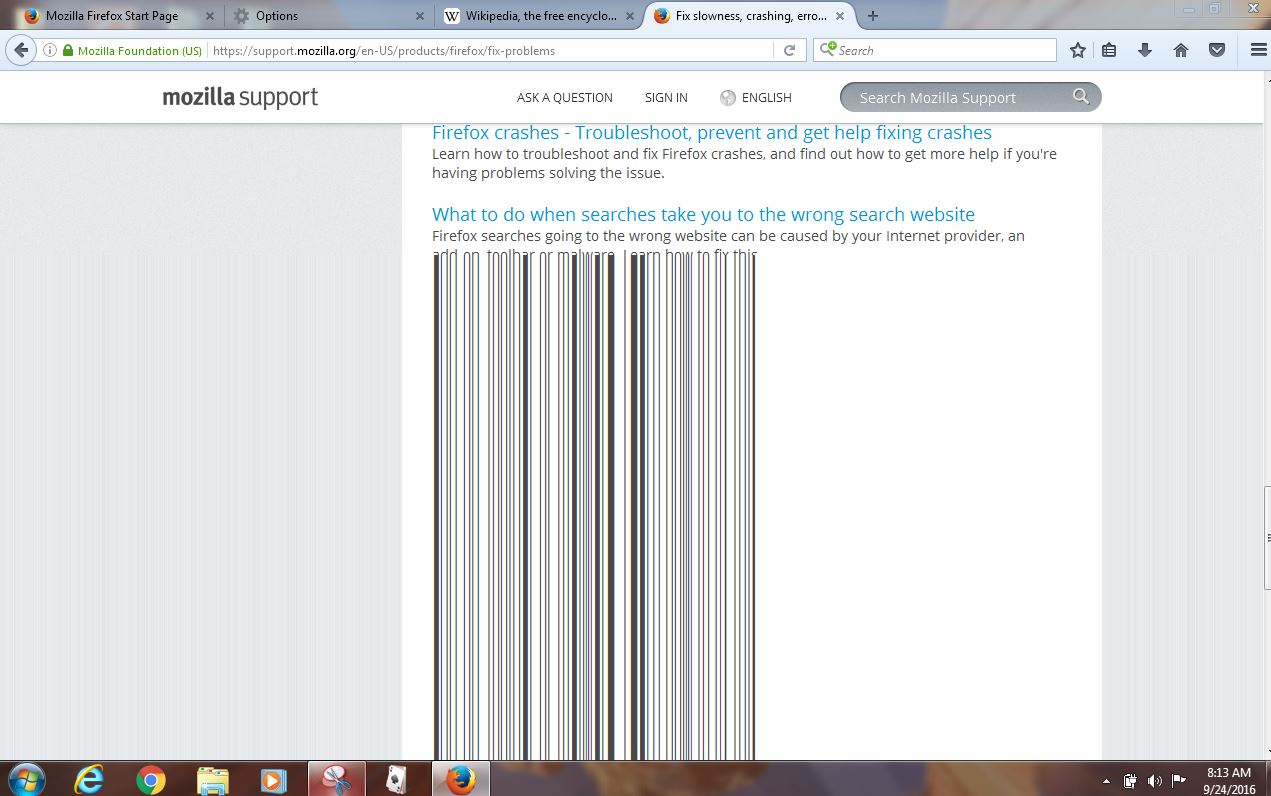
tearing when scrolling

Hello. I have trouble with Firefox. When i am scrolling pages, I am watching screen tearing. I can not catch this point in the screenshot.but it looks like a piece of strip with small squares in another browser i have not this problem. but i am like firefox. please help me.
Alle Antworten (2)
Ausgewählte Lösung
Hello RichardHM, try disabling graphics hardware acceleration.
You will need to restart Firefox for this to take effect so save all work first (e.g., mail you are composing, online documents you're editing, etc.).
Then perform these steps:
- Click the menu button
 and select Options on Windows or Preferences on Mac or Linux.
- Select the Advanced panel and then the General tab.
- Uncheck Use hardware acceleration when available.
- Restart Firefox and see if the problems persist.
Did this fix your problems? Please report back to us!
If the problem is resolved, you should check for updates for your graphics driver by following the steps mentioned in these Knowledge base articles:
Thank you.
Even tho my problem with scrolling was slightly different than this (https://support.mozilla.org/en-US/questions/1140390), the solution ideato proposed above worked for me.
My pages were turning into long vertical streams sort of bleeding down the page (whether text, image or both). But this seems to have fixed the problem.
I'm including a screen shot so it might help someone else looking to solve an issue more similar to what I was seeing.