


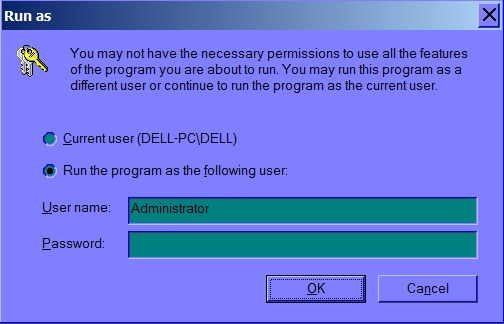
I cannot install the the Firefox Setup Stub 44.0.exe file because the Administrator tab that asks for password will come up and only for Firefox installation

Every time I try to install the firefox program using Firefox Setup Stub 44.0.exe, the Administrator tab that asks for a password will appear. This is unusual because it the Administrator tab that asks for a password does not appear for any other program installation on my system. For some odd reason, it will not let me install Firefox. Thank you.
Alle Antworten (5)

When installing software system-wide administrator privileges are needed. This is not specific to Firefox. Enter your administrator password and you should be good to go.
If you'd expect a UAC prompt instead you'd better ask in a Microsoft forum.
Try using the full, off-line installer package. https://www.mozilla.org/en-US/firefox/all/
That works for me on Windows 7 for getting around needing the Administrators password.
christ1 said
When installing software system-wide administrator privileges are needed. This is not specific to Firefox. Enter your administrator password and you should be good to go. If you'd expect a UAC prompt instead you'd better ask in a Microsoft forum.
the-edmeister said
Try using the full, off-line installer package. https://www.mozilla.org/en-US/firefox/all/ That works for me on Windows 7 for getting around needing the Administrators password.
I have tried this for some time. It doesn't work. Strangely enough, other browser installations such as Aurora, Opera and Chrome work just fine.
Did you reboot the computer after uninstalling Firefox and verified that the Firefox program folder is gone before (re)installing the full Firefox version?
Are you downloading Firefox and saving it to disk; and then launching the full, off-line installer?