


Autopopulate for Yahoo email works fine with IE but - suddenly - not with Firefox. Tons of ppl report prob, tons of unhelpful replies. Anyone know For Sure?

There are tons of recent, older and old posts about this quirky glitch: The "To" field in a Yahoo email pre-populates the complete email address (from drop-down choices) as soon as you enter the first couple of letters of the email. https://answers.yahoo.com/question/index?qid=20140606091849AAMTFN1&soc_src=mail&soc_trk=ma
At least that's how it used to work with Firefox. And that's how it still works with IE.
No one seems to know why this 'feature' suddenly becomes disabled ... and no one seems to know how to correct and restore it. Is there ANYONE who actually understands the problem - AND the solution?
Alle Antworten (13)
Sorry to hear that you are having issues with this website.
Many site issues can be caused by corrupt cookies or cache. In order to try to fix these problems, the first step is to clear both cookies and the cache. Note: This will temporarily log you out of all sites you're logged in to. To clear cache and cookies do the following:
- Click the menu button
 , choose History, and then "Clear Recent History...".
- Under "Time range to clear", select "Everything".
- Now, click the arrow next to Details to toggle the Details list active.
- From the details list, check Cache and Cookies and uncheck everything else.
- Now click the "Clear Now" button.
Further information can be found in the Delete browsing, search and download history on Firefox article.
Did this fix your problems? Please let us know.
Thanks, Wesley - your diagnosis (the problem is caused by a corrupt cookie) seems to be the most common diagnosis ...
The only reason I haven't followed this/your advice is because: a) I believe -- perhaps wrongly -- that there are some (Yahoo) cookies I am better off NOT deleting (ie those that auto- or pre-populate password fields, etc); and b) I've never been able to figure out how to identify among a listing of cookies which one(s) are corrupt.
For example: - Firefox Tools>Options>Privacy displays this sentence with two phrases linked: You may want to clear your recent history, or remove individual cookies.
Clicking on "remove ...", I get a display of all cookies on my system - which includes several associated with Yahoo. But how do I identify which one(s) are corrupt ... and which one(s) I do NOT want deleted?
Thank you again for your time and interest.
Sadly, you cannot identify which cookies are corrupt.
Clearing just your cookies and cache should not delete your saved form entries or saved passwords. Simply ensure that you are only deleting your cookies and cache, not your history or passwords.
When you clear your cache and cookies, you will be logged out of every website that you are currently logged into, but you will be able to log back in and, as I said, your passwords should remain saved.
OK - I'll go ahead and ONLY clear cache ... and delete ALL cookies ...
One final question, Wesley: Am I mistaken when I believe not ALL cookies are undesirable ... that some/a few of them perform a desirable and helpful function? Or are these kind of useful functions totally and always completely unrelated to cookies?
Thank you again.
Cookies are primarily used to track who is visiting a website and it can save website settings like font size customization that you have setup. For example, if a shopping website asks for your postal code so that it can display stores close to you, your postal code will be stored as a cookie so that you don't have to enter your postal code every time you load the website. There are both good and bad cookies.
If a cookie is corrupt, it isn't loading properly. Therefore the website tries to load it, but it cannot fully to do so. This can create errors. Deleting cookies will just force the website to create a new cookie which will load properly.
If you would like more information on cookies, please read this page on the Webopedia website.
Very helpful info, Wesley - thank you. I hadn't realised -- should have -- that deleting 'good' cookies should be expected to result in the site re-loading the same 'good' cookie ...
Sadly, the clear-cache/delete-cookies (and reboot) solution did not work ... autopopulate still works for IE ... still doesn't for FF.
Thank you for your time and efforts, Wesley - there are worse problems, and others are more in need of your help and advice.
Mozilla values all of its users and believe that all problems are equally important.
Unfortunately, I fear that this is an incompatibility on our end or on Yahoo's end. If that is the case, then there is nothing that the support team can do.
If you could, please file a bug report on Bugzilla and our developers will take a look at the issue. Please inform Yahoo as well, so that they can address the issue as well, as it could be an issue on their end.
Unfortunately, I do not have a Yahoo email account, so I cannot take a look at the issue myself. I will contact some of the other volunteers and see if they are experiencing the same issue.
Sorry for any inconveniences caused by this issue.
Thanks - I'll file a report ... but contacting Yahoo is pointless - as is also apparent in the multiple posts made on Yahoo 'help' forums addressing the same issue ...
Like everything else about the internet, someone somewhere knows something ...
Thank you again for your kind assistance, Wesley.
This link still works for me to populate the To field:
- [/questions/1025397] mailto app isn't working
I wonder whether it's related to there being an ad on the suggestion list? (See attached screen shot.) If there were only one match, Yahoo might go ahead and enter it, but for now it seems you need to press Tab to select the highlighted match.
Regarding the linked Yahoo discussion, it seems to refer to a problem of a suggestion missing from the list, which sounds like a different issue from the one you're describing: https://answers.yahoo.com/question/index?qid=20140606091849AAMTFN1&soc_src=mail&soc_trk=ma
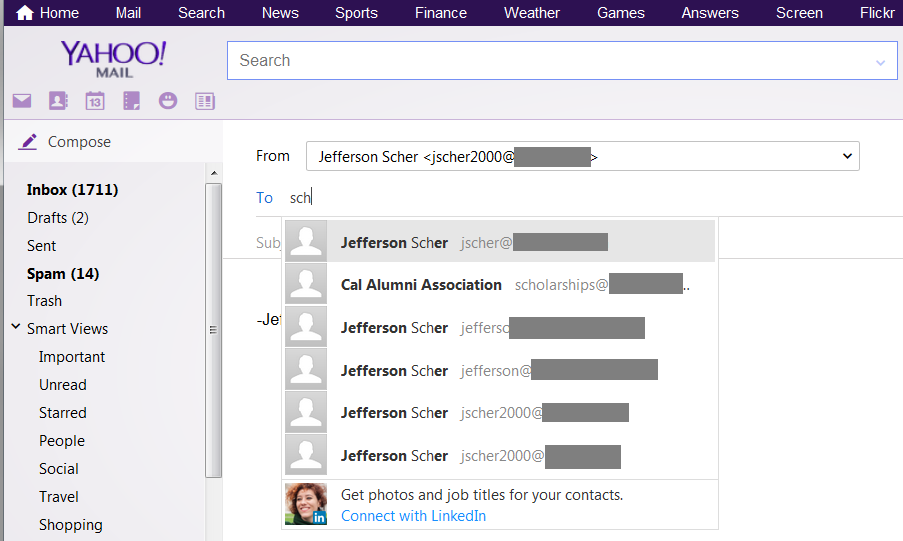
I can't be 100% sure, but I'd say 'no' - the appearance of an ad (as last 'suggestion') doesn't seem to have any effect, since the autopopulate feature DOES still work for many/most of the other email addies in my Contact List - and those options DO include an ad each time ...
I tried to avoid excessive detail in describing the problem - but, in my case, it was identical to the issue described by Terri in the link (and listed as the second Answer): The auto-populate options list first became corrupted (specific optional-listings appearing with the same nick-name) ... and after the corrupted listings were deleted, no efforts or attempts of any kind could restore the auto-populate feature for them.
The three fields have an autocomplete=off attribute as you can see in the Inspector if you right-click that area. That will prevent Firefox from saving them as autocomplete data. Firefox ignores autocomplete=off for password fields, but not for saved form data.
This will be my final post - while I'm very, very appreciative of the time and efforts being made, anyone who has had this problem will recognize the point I made in the headline: Tons of theories and proposals ... no resolution.
To repeat: It's NOT that auto-complete does not work in FF - it does work, and it works beautifully - with the only exception that it can suddenly STOP working for one or more email address(es) for which it HAD been working and which WERE and still ARE 'saved' (and then deleted and then re-saved) in the Yahoo Contact list.
The objective of any corrective action is to to able to RESTORE the auto-populate function so that it works consistently AND universally.
The sudden "corruption" of the auto-populate function is unique to Firefox - there has never been a comparable issue with IE (in which -- in an attempt to isolate the issue as either a Yahoo problem or a FF problem - I can delete and successfully restore the auto-populate feature any and every time.)
Please don't read anything into my unwillingness to contribute further to this thread. It's simply a question of efficiency: It takes much less time to tap full email addies into the TO field than it does to try and (re)articulate the issue.
Thank you all.