


YouTube won't play without Flash

When trying to play videos on YouTube, Firefox always attempts to play them using Flash. I have set Flash plugin to "Ask to Activate", because I'd like to avoid it as much as possible. So, when I click on a YouTube video, in the video frame there's a message "Activate Adobe Flash".
Furthermore, if I block Flash on YouTube completely using site permissions, videos again won't play, only this time the message is "This plugin is disabled".
What is causing this issue and how to fix it? Why won't videos play using HTML5 first? It's pretty annoying, especially since YouTube recently announced they had made the transition to HTML5 being the default player, yet that doesn't seem to be working in Firefox
Alle Antworten (4)
If you check YouTube's HTML5 support page, what boxes show a blue checkmark vs. red exclamation point?
Unless some features have been disabled, it should be "5 of out of 6" as in the attached screen shot.
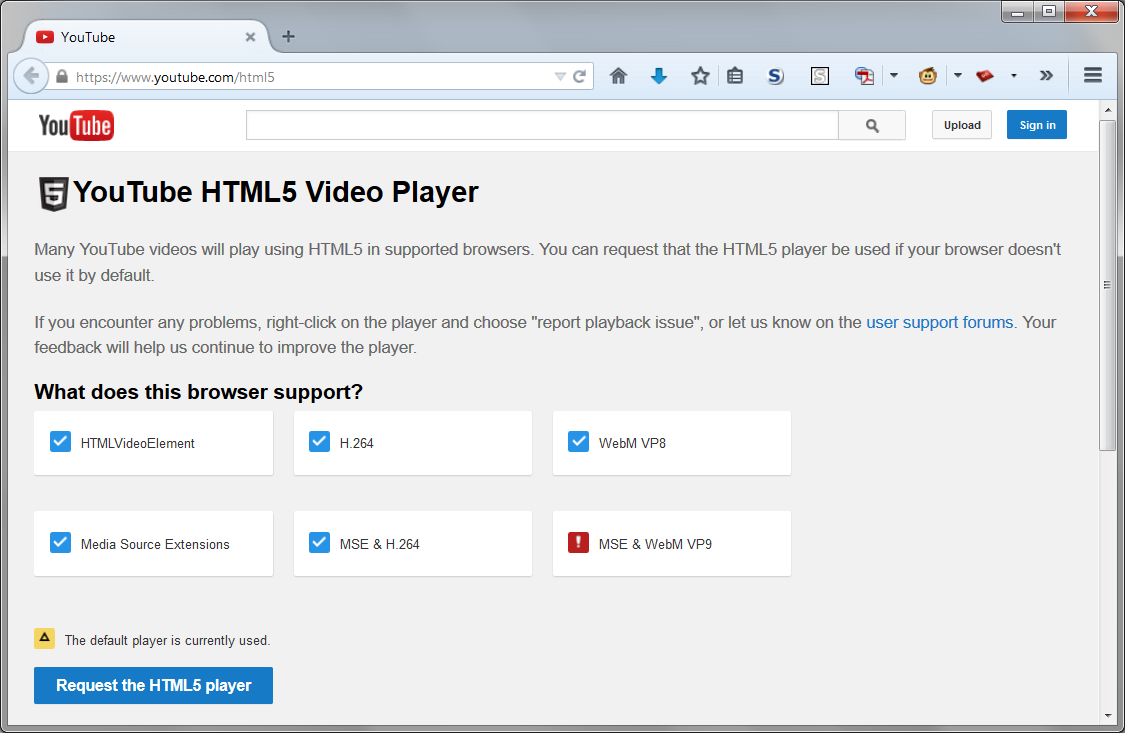
Geändert am von jscher2000 - Support Volunteer
Yes, that's how it looks.
If you have the blue button which says "Request the HTML5" player on that page, try clicking that to see whether it makes any difference. There seems to be some inconsistency is what YouTube uses as the default player and that may help force it.
I have that button. However, since I have Firefox set to delete all cookies every time it quits, that preference would get reset every time as well.