


Need help with real support person at fire fox.

I need help with a real support person. I am very older, and trying to restore something and do not underestand in community what some folks are talking about.
How can I talk to a real live support person and get help at firefox for windows?
Thanks.
Všechny odpovědi (8)

Please explain the problem in detail. What happens? Error messages?
This is the official support site for Mozilla Firefox.
The people who answer questions here, for the most part, are other Firefox users volunteering their time (like me), not Mozilla employees or Firefox developers.
If you want to leave feedback for Firefox developers, you can go to the Firefox Help menu and select Submit Feedback... or use this link. Your feedback gets collected by a team of people who read it and gather data about the most common issues.
OK, now I have a couple of minutes to chat here. My saved passwords totally disappeared. I have looked here and attempted to resolve the issue on things I read. But, the solutions I read, does not work for me, as I am probably not truly comprehending.
Several things on my computer changed, but most important at moment is list of saved passwords for sites I use a lot. Bookmarks are gone, but I discovered pushing ALT key pops them up. Someday I will figure out how to have them stay. But critical now is missing huge list of passwords.
Thanks for listening to an old fart.
You are not the only one with this problem. So let's get started;
Start Firefox in Safe Mode {web link} by holding down the <Shift> (Mac=Options) key, and then starting Firefox.
A small dialog should appear. Click Start In Safe Mode (not Refresh). Is the problem still there?
beliefteam said
Bookmarks are gone, but I discovered pushing ALT key pops them up.
Are you talking about the bookmarks toolbar?
If you would like the top menu bar (File, Edit, View...) to be visible all the time, you can use the toolbars list to turn it on. To show that list, use any of these methods:
- right-click (on Mac Ctrl+click) a blank spot on the tab bar (or right-click the "+" button)
- (menu bar) View > Toolbars
On Windows, tap the Alt key to activate the menu bar temporarily. - in Customize mode > Toolbars button (see: Customize Firefox controls, buttons and toolbars)
To turn on the Menu Bar, Bookmarks Toolbar, or other bars, click it on the list.
There also is an optional bookmarks menu button ( ) you can add to the main toolbar. Two options for doing that. Either:
(A) Use the Customize panel (Customize Firefox controls, buttons and toolbars) to drag the icon to the desired spot on the toolbar
(B) Use the method from Bookmarks in Firefox - section entitled: How do I add the Bookmarks Menu button to the toolbar?
- Click the "Library" button:

- Click "Bookmarks"
- Click "Bookmarking Tools"
- Click "Add Bookmarks Menu to Toolbar"
beliefteam said
But critical now is missing huge list of passwords.
Are they missing when you click 'Saved Logins' ? (see screenshot)
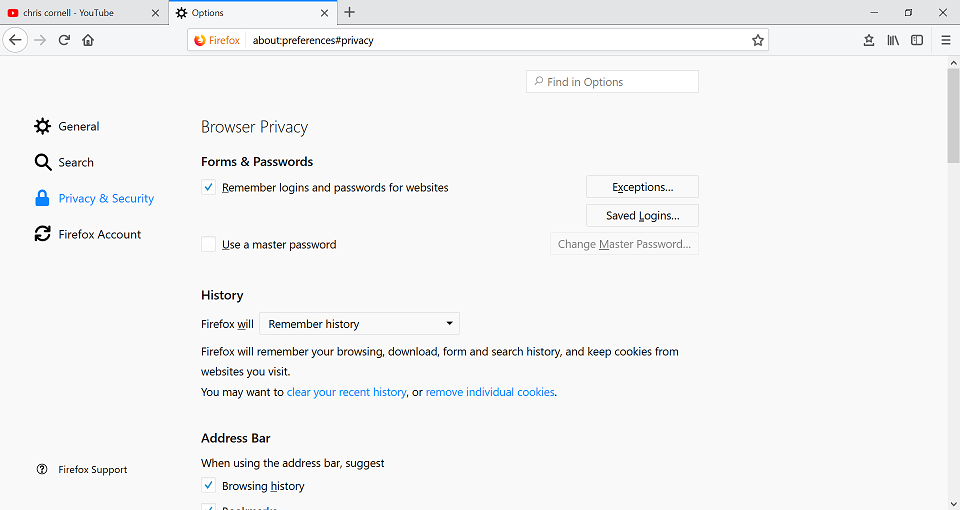
Yes the ones that use to be there, LOTS. Now it shows new ones since I started over.
Thanks
Look on your desktop. Do you see a folder called; Old Firefox?
https://support.mozilla.org/en-US/kb/recovering-important-data-from-an-old-profile
https://support.mozilla.org/en-US/kb/back-and-restore-information-firefox-profiles
https://support.mozilla.org/en-US/kb/how-run-firefox-when-profile-missing-inaccessible
Sorry, I am an idiot. I was following the https://support.mozilla.org/en-US/kb/back-and-restore-information-firefox-profiles, as best I could for over an hour, and some of the information it says to do, must assume there are things happening, which I do not know about.
Sorry, but I am lost.
As the instructions jump around, they loose me. I could never see a xxxxxxx.default backup.
From there, I stopped, and started over many times, but, I never saw such item. I believe the instructions assume things that I may know, and I do not know.
Besides telling me to go postal on my self, Is there some instructions that tells an unborn infant how to do this, one that has never seen a computer?