


In macOS (Tahoe), how to get Firefox to follow system dark/light settings that INCLUDE the web pages themselves?

macOS Tahoe, Firefox 152.0.3 macOS settings include "Appearance - Auto"; i.e. system switches from light to dark at sunset. While the "top area" (tabs, address bar, bookmarks bar) of Firefox follows this - some of the pages themselves do NOT???
I found this website which was at top of the search results. I tried to follow it, but it seems to be badly outdated in certain key respects: esp wrt a setting called "ui.systemUsesDarkTheme" in about:config. I set this to "True", but may have screwed this up!! First question: Should I "reset" this somehow?
Finally: To get at the primary question, there are two "sub-questions" that may explain my confusion more clearly:
1. Is there no ***simple way*** to get Firefox & webpages I view to follow macOS Light/Dark appearance?? What are the CORRECT steps?
2. Do individual webpages have the ability to "decide for themselves" whether or not they will adhere to the system light/dark settings. This may well be an officially "stupid question", but while "most" webpages remain "Light" (including this Support page), a few pages appear dark.
Thanks, ~S
Modified by tmp003
Chosen Solution
For your question:
system switches from light to dark at sunset. While the "top area" (tabs, address bar, bookmarks bar) of Firefox follows this - some of the pages themselves do NOT?
Correct. Things have to be explicitly coded to support a different color scheme. So the browser is, and passes it down to the content, but it's up to the content to adapt, if it's capable of multiple color schemes.
Do individual webpages have the ability to "decide for themselves" whether or not they will adhere to the system light/dark settings.
Yes, in a way. They don't "adhere" by default. A page can be any color or style. Historically just one fixed theme usually. Adapting to device preferences (color, touch, motion, dimensions etc.) is a relatively newer addition to the options out there. Following the media support for user's color scheme preference is something extra that needs to be intentionally added on top (details in: https://developer.mozilla.org/en-US/docs/Web/CSS/Reference/At-rules/@media/prefers-color-scheme …) so that's for site operators to consider such enhancement.
Sites can be aware of the preference and "do something" about it, ignore it, do something custom to the tune of themes… or not be aware of it at all. The results come from the site code and are a deliberate feature. (Notably support.mozilla.org doesn't have a dark theme, while developer.mozilla.org does and not just adapts automatically but also provides a manual override for those not willing to follow the system or just looking to change the theme for any arbitrary reason.)
Is there no simple way to get Firefox & webpages I view to follow macOS Light/Dark appearance?
So you should have your browser follow that correctly, and also pass it along to the websites, for them to adapt accordingly if they're able to. Since you can't force a BBC or CNN to add such support ("simple way"?;)) there are addons out there that inject into the site code and forcibly change the colors, invert elements etc. but they might be slow, break things, and you just might experience unexpected things without too much support if the results do not work, you're kinda voiding the warranties left and right;) But they're popular and have a large following. (I personally don't allow addons to access my content, but your mileage may vary.)
All Replies (6)
Hi
As a first step, I would reset that about:config setting. Not really needed and could make things more complex later on.
Websites may have settings to either use light, dark or system colour themes. This is a per website setting. Setting it to the system option will follow macOS. The default theme in Firefox will also follow the system setting.
Paul, Thanks - I agree the 'about:config' setting should be reset. But HOW do I do that? I see nothing that says "RESET" or "DEFAULT"... In fact, the setting now looks different than before I changed it. I **THINK** it had some check boxes to set the data type... Now, It's Boolean, and "Yes". How do I undo that?
The article linked appears to be a SEO/clickbait AI slop collected from random outdated (half a decade irrelevant) folk wisdom that's not really relevant today.
The browser follows the system style out of the box, as does the default theme. (If you use a custom theme, its luminosity/contrast can be overriding the style further downstream in a specific way, but let's stick with factory defaults for now.)
The mentioned pref does no longer exist, so when you added it, you created a new entry so there's nothing to "revert to" otherwise you'd have an arrow icon — just use the trashcan icon to remove it completely as its of no use today.
Chosen Solution
For your question:
system switches from light to dark at sunset. While the "top area" (tabs, address bar, bookmarks bar) of Firefox follows this - some of the pages themselves do NOT?
Correct. Things have to be explicitly coded to support a different color scheme. So the browser is, and passes it down to the content, but it's up to the content to adapt, if it's capable of multiple color schemes.
Do individual webpages have the ability to "decide for themselves" whether or not they will adhere to the system light/dark settings.
Yes, in a way. They don't "adhere" by default. A page can be any color or style. Historically just one fixed theme usually. Adapting to device preferences (color, touch, motion, dimensions etc.) is a relatively newer addition to the options out there. Following the media support for user's color scheme preference is something extra that needs to be intentionally added on top (details in: https://developer.mozilla.org/en-US/docs/Web/CSS/Reference/At-rules/@media/prefers-color-scheme …) so that's for site operators to consider such enhancement.
Sites can be aware of the preference and "do something" about it, ignore it, do something custom to the tune of themes… or not be aware of it at all. The results come from the site code and are a deliberate feature. (Notably support.mozilla.org doesn't have a dark theme, while developer.mozilla.org does and not just adapts automatically but also provides a manual override for those not willing to follow the system or just looking to change the theme for any arbitrary reason.)
Is there no simple way to get Firefox & webpages I view to follow macOS Light/Dark appearance?
So you should have your browser follow that correctly, and also pass it along to the websites, for them to adapt accordingly if they're able to. Since you can't force a BBC or CNN to add such support ("simple way"?;)) there are addons out there that inject into the site code and forcibly change the colors, invert elements etc. but they might be slow, break things, and you just might experience unexpected things without too much support if the results do not work, you're kinda voiding the warranties left and right;) But they're popular and have a large following. (I personally don't allow addons to access my content, but your mileage may vary.)

For Firefox to follow the dark theme, you can go to Firefox settings, on the left bar you can spot appearance, after clicking on that, you get the option for light, dark and follow the system. You can either click on dark or follow the system theme if you are in dark mode, Firefox will automatically be in dark mode. This setting supports some websites too, this isn't an universal solution but this will do it for some major websites which follow the browser's appearance.
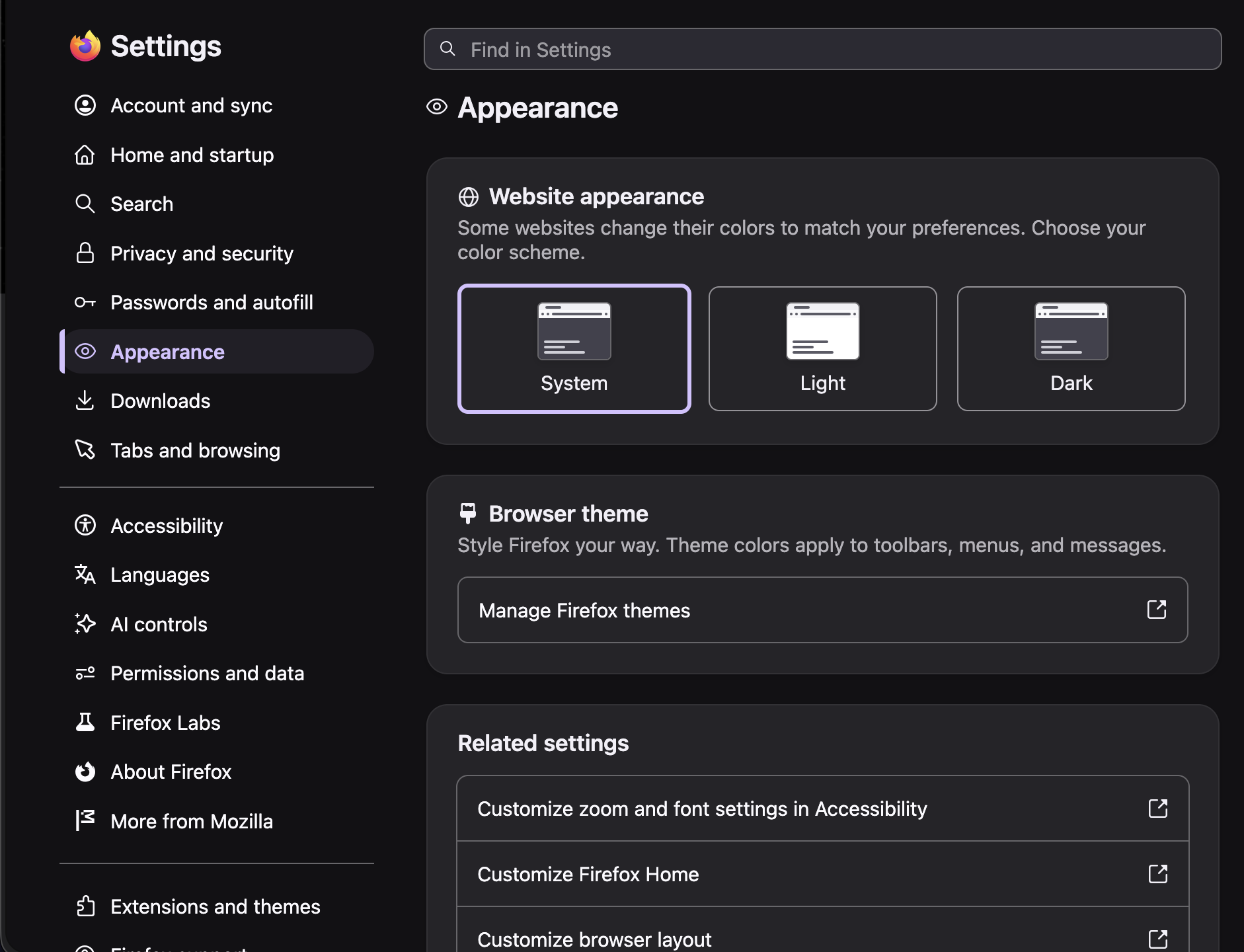
@jbr: Thanks a million. I've deleted that 'ui.systemUsesDarkTheme' from 'about:config' ... the suggestion to delete it was key! I had no idea that I had inadvertently created it!!
And your 2nd answer goes a long way explaining the "odd behavior" I've seen... I had never tried the macOS settings for "Light/Dark/Auto" until just very recently - after upgrading to macOS Tahoe. I only did it now as my vision is not as good as it once was, and contrast seems to be the thing I struggle with the most. Your explanation of the "downstream behavior" of the content providers makes perfect sense.
Once again - thanks for your help.
~S
Modified by tmp003