


Windows 10 reached EOS (end of support) on October 14, 2025. If you are on Windows 10, see this article.

Search Support

Avoid support scams. We will never ask you to call or text a phone number or share personal information. Please report suspicious activity using the “Report Abuse” option.

Learn More
Solved

Outlook.jpをThunderbirdで使用すると受信は正常ですが、SMTP送信時に「SmtpClientAuthentication is disabled for the Mailbox」と表示され送信できません。

tbuser482 replied
tbuser482

Outlook.jpの個人アカウントをThunderbirdで使用しています。 IMAPは outlook.office365.com / 993 / SSL/TLS / OAuth2 で正常に受信できます。

SMTPは smtp-mail.outlook.com / 587 / STARTTLS / OAuth2 で送信すると、 535 Authentication unsuccessful, SmtpClientAuthentication is disabled for the Mailbox. と返されます。

smtp.office365.com / 587 / STARTTLS / OAuth2 も試しましたが、こちらは接続タイムアウトになりました。 MicrosoftアカウントのOAuth2認証と2段階認証は完了しています。 Outlook Web版・新しいOutlookでは送受信正常です。 Microsoftサポートには問い合わせましたが、Thunderbird側へ確認するよう案内されました。

この状態でThunderbird側にまだ確認すべき設定がありますか? それともMicrosoft側でSMTP AUTHが無効になっている状態でしょうか?

Outlook.jpの個人アカウントをThunderbirdで使用しています。 IMAPは outlook.office365.com / 993 / SSL/TLS / OAuth2 で正常に受信できます。 SMTPは smtp-mail.outlook.com / 587 / STARTTLS / OAuth2 で送信すると、 535 Authentication unsuccessful, SmtpClientAuthentication is disabled for the Mailbox. と返されます。 smtp.office365.com / 587 / STARTTLS / OAuth2 も試しましたが、こちらは接続タイムアウトになりました。 MicrosoftアカウントのOAuth2認証と2段階認証は完了しています。 Outlook Web版・新しいOutlookでは送受信正常です。 Microsoftサポートには問い合わせましたが、Thunderbird側へ確認するよう案内されました。 この状態でThunderbird側にまだ確認すべき設定がありますか? それともMicrosoft側でSMTP AUTHが無効になっている状態でしょうか?

All Replies (2)

Odabrano rješenje

Please post a screenshot of your SMTP server settings pane. thank you

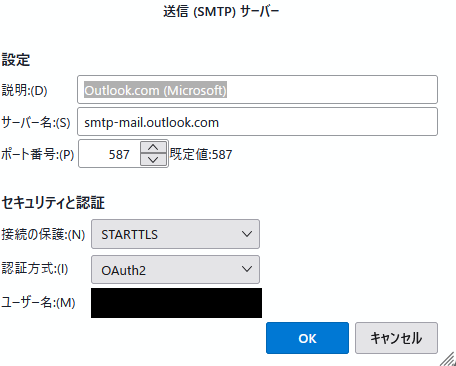
ご返信ありがとうございます。 SMTPサーバー設定画面のスクリーンショットを添付します。 ユーザー名部分のみ個人情報のため伏せています。

現在の設定は以下です。 smtp-mail.outlook.com / 587 / STARTTLS / OAuth2

この設定で送信すると、 535 Authentication unsuccessful, SmtpClientAuthentication is disabled for the Mailbox. と返されます。

追加で確認すべき設定があれば教えてください。
Postavite pitanje

You must log in to your account to reply to posts. Please start a new question, if you do not have an account yet.