


Can't login to one of my email addresses.

I can't login to one of my email addresses. It says login to server with username failed. I tried all of the suggestions (using a pop server for example) and none of them seem to work. Please help.
All Replies (16)
Is this resolved? If not, share full text of error message and a screenshot of account's server settings pane . thank you
Login to server mail.comcast.net with username -------@comcast.net failed.
How do I post a screenshot?
Izmjenjeno od strane redfur01702
First, I responded because you will never get help unless details are here. Second, I am not personally familiar with comcast, but problems with comcast are frequently posted here. When replying, be sure to state whether this is first attempt or whether it's worked fine until just recently. There are a few people here that are familar with comcast and may have suggestions if they see this post. There is a nice little free untiity that does screenshots at https://www.reasyze.com/
Okay, it was working fine until I had to change passwords. Finally. I got the screenshot saver. Here is the image (I think).
Izmjenjeno od strane redfur01702
you can delete the existing password by going to settings>privacy&security and clicking savedpasswords and then showpasswords. then highlight and delete the displayed rows for that account. That may allow you to be prompted for the password.
I already changed the password. The error message started coming up after I did.

I have the same issue with my account, which I've only recently set up. I press cancel and it goes through and sends / receives mails in any case. It's just annoying / frustrating.
Yeah, that isn't it. It has my new password. Is there anything else I can try? Do you need more specifics? I'm not great at describing computer stuff but I can try.
Here is all the info I have for comcast. Maybe it will help: The correct incoming server is imap.comcast.net for IMAP or pop3.comcast.net for POP, plus you have to enable access to the account by mail apps like TB: Set Port to 587 Set Connection Security to : STARTTLS for SMTP smtp.comcast.net, normal password
https://www.xfinity.com/support/articles/third-party-email-access
https://www.xfinity.com/support/articles/email-client-programs-with-xfinity-email
To dave466. I think you are stating that the account sends and receives even with no password. I encourage you to post a new thread, as your issue may be hidden here. It isn't anything with which I am familiar.
I'm going to spend the next few day looking into all this. I'll let you know what I find and if the problem is resolved. Thank you very much for the help.
redfur01702 said
Finally. I got the screenshot saver. Here is the image (I think).
https://support.mozilla.org/en-US/kb/how-do-i-create-screenshot-my-problem After you have the image, below the Post a Reply box click on [Browse] under the Add images (optional): and find the image and open and upload it.
I deleted the screenshot because it had too much of my information on it. But I fiddled around with the new program and was able to cross out sensitive information.
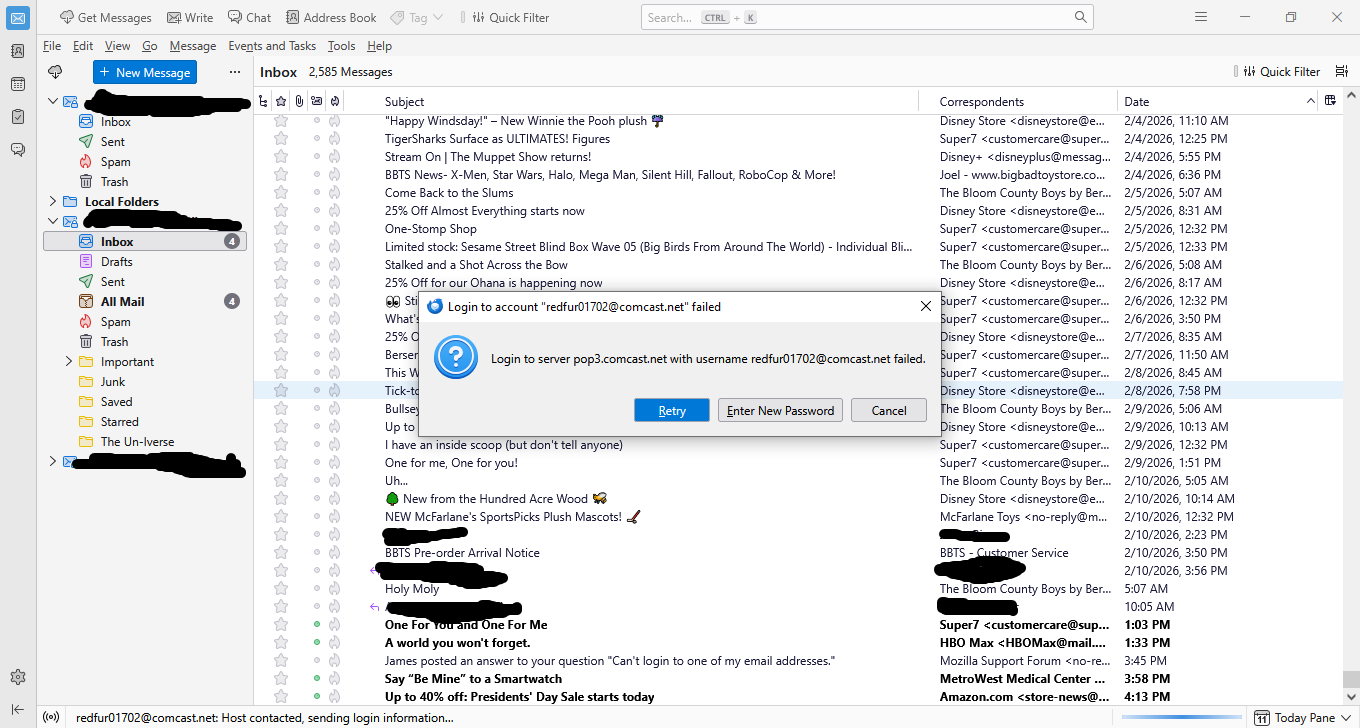
Give me a couple of days. This is going to take some time and effort on my part and I need to set aside the time. I can't spend all day on this today. Thank you very much for your help so far. It's very much appreciated. I'll look into this more on Friday and get back to you. Thank you kindly.