


my favorite addon is apparently violating tos - is it safe to reenable?

One of if not my most favorite addon "context search" has recently been flagged as violating mozillas tos. I'm talking about this one: https://addons.mozilla.org/de/firefox/addon/contextsearch
I am unable to find further explanation or the exact reason for this decision, but I am able to activate it again at my own risk. Seeing as I don't know what the problem is, I am hesitant to do so. Could someone explain what the issue is and if it's safe to continue using that addon? Am I or is my personal information at risk, since I have been using the addon regularly?

Izabrano rješenje
Oh, now that I look into this further, it looks like the latest version was released under a new ID, which prevents the automatic updater from picking it up.
Also, you need to migrate your data (export/import) to preserve your settings. This thread has the steps:
https://github.com/odebroqueville/contextSearch/discussions/231#discussioncomment-14095619
Pročitajte ovaj odgovor sa objašnjenjem 👍 1All Replies (5)
Since the extension is still available on the Add-ons site, I don't think it is a serious issue for the current version. Could you try updating your extensions in case this problem is related to using an older version on your Firefox? On the Add-ons page, just above the Extensions list, you should see a gear/wheel/cog/sprocket icon. That drops down a menu with "Check for Updates".
jscher2000 - Support Volunteer said
Since the extension is still available on the Add-ons site, I don't think it is a serious issue for the current version. Could you try updating your extensions in case this problem is related to using an older version on your Firefox? On the Add-ons page, just above the Extensions list, you should see a gear/wheel/cog/sprocket icon. That drops down a menu with "Check for Updates".
checking for updates yields nothing
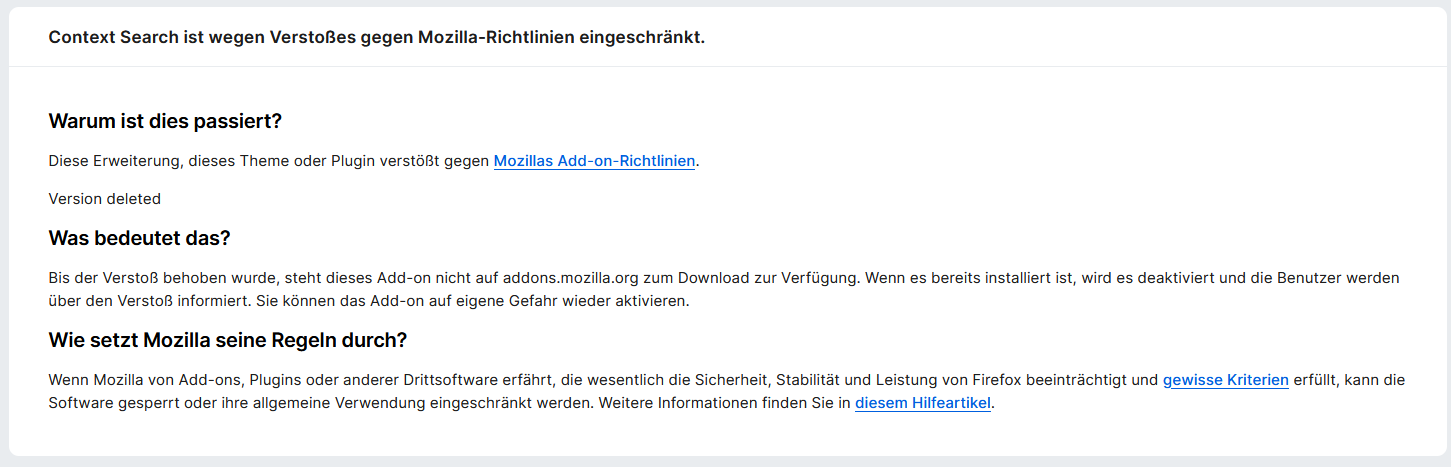
when clicking on "show details" regarding the automatic deactivation, I get this information, which to me, just seems like a generic text, except for "Version deleted". Could this be the autor of the addon deleting the latest release and firefox not automatically handing me the prior release via update because it's not the newest release stored in the system?
Izmjenjeno od strane Beuteschema
Odabrano rješenje
Oh, now that I look into this further, it looks like the latest version was released under a new ID, which prevents the automatic updater from picking it up.
Also, you need to migrate your data (export/import) to preserve your settings. This thread has the steps:
https://github.com/odebroqueville/contextSearch/discussions/231#discussioncomment-14095619
jscher2000 - Support Volunteer said
Oh, now that I look into this further, it looks like the latest version was released under a new ID, which prevents the automatic updater from picking it up. Also, you need to migrate your data (export/import) to preserve your settings. This thread has the steps: https://github.com/odebroqueville/contextSearch/discussions/231#discussioncomment-14095619
Thank you very much, I found his github before but somehow didn't see that thread. You have helped me greatly!