


Transfer my Thunderbird Local Folders to an external drive

To gain space in my laptop’s internal disc I tried to transfer my Thunderbird Local Folders to an external disk (D:) and proceeded as follows: 1. In D: I created a folder: THUNDERBIRD 2. I copied the folder C:\Users\Hp Probook\AppData\Roaming\Thunderbird\Profiles\9o8u1km9.default-release to the folder created in 1. 3. In Thunderbird/Local Folders/Settings, I browsed and selected the folder created in D:\THUNDERBIRD\9o8u1km9.default-release
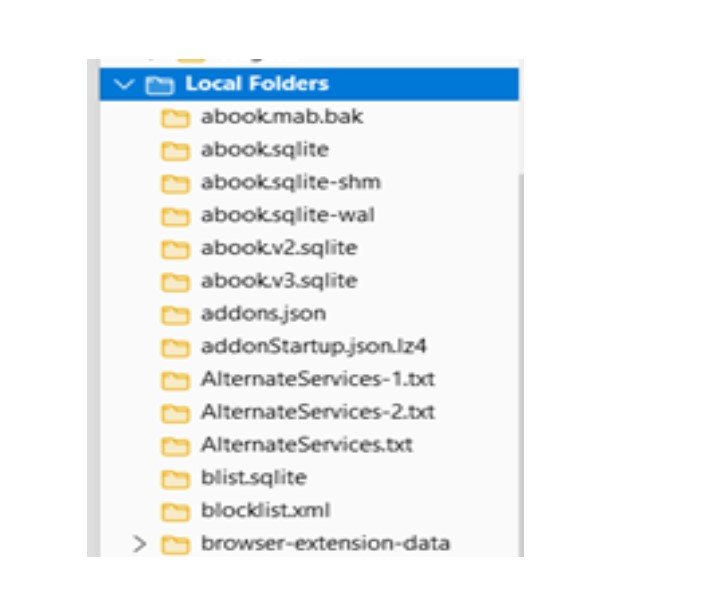
Then, the contents of Local Folders is a list of files with extensions such as: .bak, .sqlite, .json. txt...
Now, I wonder how to get back the original stored mails. I will be very grateful for any advice.
Izabrano rješenje
In Thunderbird/Local Folders/Settings, I browsed and selected the folder created in D:\THUNDERBIRD\9o8u1km9.default-release
You set the 'Local Directory' for the 'Local Folders' account to a folder which is a copy of your profile directory.
Then, the contents of Local Folders is a list of files with extensions such as: .bak, .sqlite, .json. txt...
Thunderbird is showing you exactly what you told it to show - the contents of a copy of your profile.
Now, I wonder how to get back the original stored mails.
Set the 'Local Directory' for the 'Local Folders' account to the correct path: D:\THUNDERBIRD\9o8u1km9.default-release\Mail\Local Folders
Pročitajte ovaj odgovor sa objašnjenjem 👍 1All Replies (2)

Odabrano rješenje
In Thunderbird/Local Folders/Settings, I browsed and selected the folder created in D:\THUNDERBIRD\9o8u1km9.default-release
You set the 'Local Directory' for the 'Local Folders' account to a folder which is a copy of your profile directory.
Then, the contents of Local Folders is a list of files with extensions such as: .bak, .sqlite, .json. txt...
Thunderbird is showing you exactly what you told it to show - the contents of a copy of your profile.
Now, I wonder how to get back the original stored mails.
Set the 'Local Directory' for the 'Local Folders' account to the correct path: D:\THUNDERBIRD\9o8u1km9.default-release\Mail\Local Folders
Many thanks for the very clear tip!