


library spacing

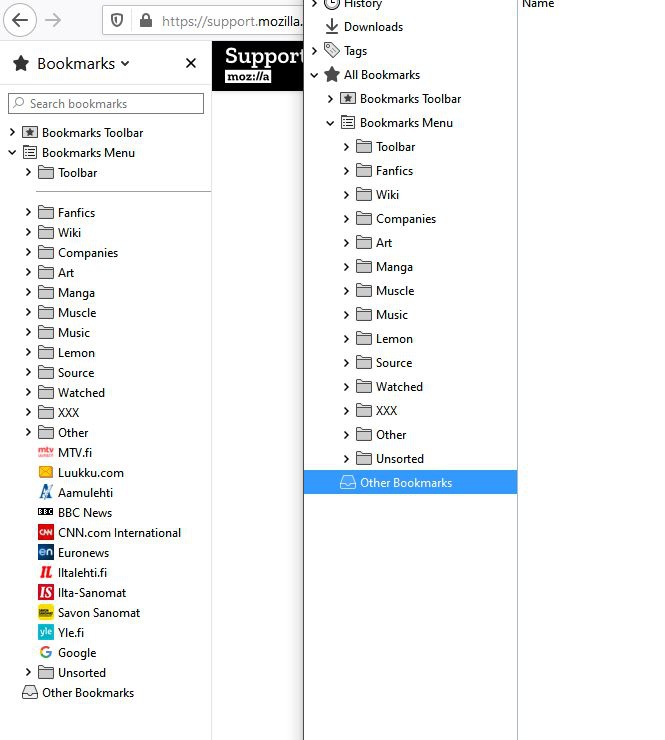
OK, so the latest update messed the library spacing again. Could someone give a hand as I can't find way to fix this one?
My gobbled together version on https://support.mozilla.org/en-US/questions/1267773 works on sidebar and menu drop-bar but library/show-all-bookmarks has far too much space between the lines.
Izabrano rješenje
Switched @-moz-document url(chrome://browser/content/places/places.xhtml){ ... } to @-moz-document url(chrome://browser/content/places/places.xul) and library works as it should.
What?
Pročitajte ovaj odgovor sa objašnjenjem 👍 0All Replies (5)
At least you have to change places.xul to places.xhtml if you haven't done this yet.
- @-moz-document url(chrome://browser/content/places/places.xhtml){ ... }
Well, what do you know... that fixed it.
Thanks, couldn't have figured this out without you.
Spoke too soon, I'm using a different computer (laptop) and library has the same spacing problem but the fix above doesn't work.
Ideas?
Just to make clear, I'm using :
@-moz-document url(chrome://browser/content/places/places.xhtml){
- placesView treechildren::-moz-tree-row{min-height: 18px !important;}
} .sidebar-placesTreechildren::-moz-tree-row{height: 1.6em !important;}
bookmarks-view {
padding: 0px !important; font-size: 8px !important; margin-top: 0px !important; margin-bottom: 0px !important; }
- bookmarks-view treechildren::-moz-tree-row {
min-height: 8px !important; margin-top: 0px !important; margin-bottom: 0px !important; }
Sidebar and drop-bar work fine, it's just the library that causes problems.
Odabrano rješenje
Switched @-moz-document url(chrome://browser/content/places/places.xhtml){ ... } to @-moz-document url(chrome://browser/content/places/places.xul) and library works as it should.
What?