

Ova tema je arhivirana.
Pitajte drugo pitanje ako vam je potrebna pomoć.

Solved
Arhivirano
Dropdown icon becomes a word
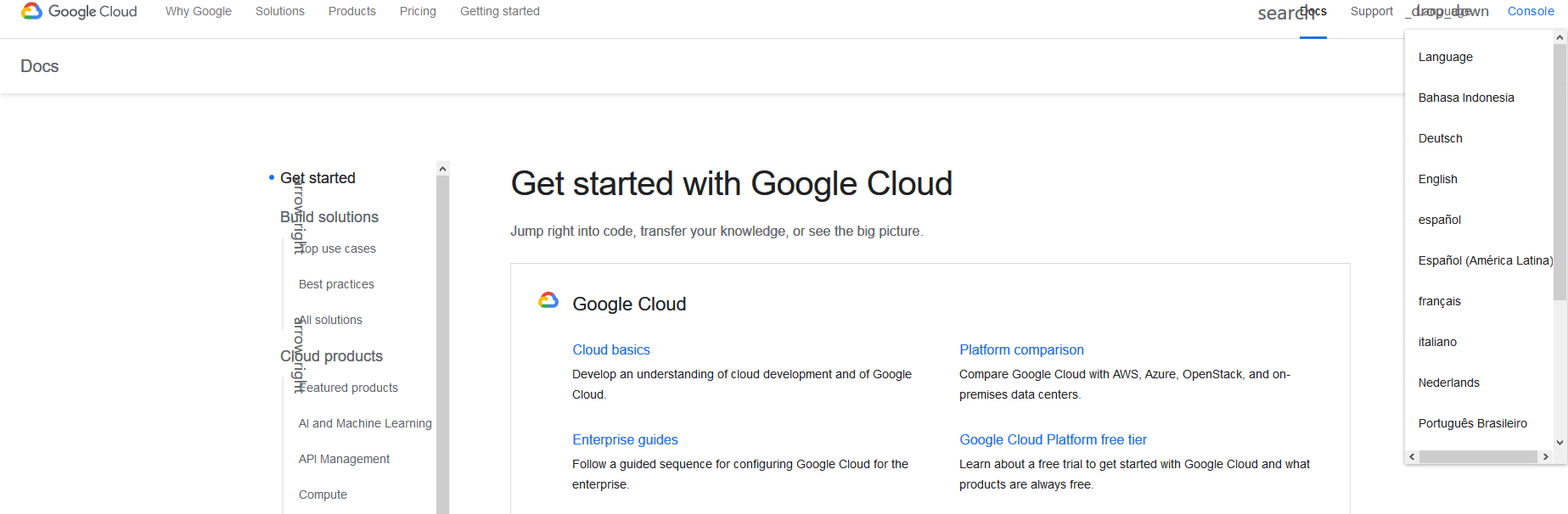
As the attached screenshot that you will see, the dropdown icon becomes a word, and it also overlaps with another word. I already enable "Always use the cursor keys to navigate within pages", but doesn't work.
Any way to fix this issue?
As the attached screenshot that you will see, the dropdown icon becomes a word, and it also overlaps with another word. I already enable "Always use the cursor keys to navigate within pages", but doesn't work.
Any way to fix this issue?
All Replies (2)
Odabrano rješenje
Check Options -> General -> Fonts & Colors -> Advanced -> Allow pages to choose their own fonts, instead of your selections above. It should be selected.
It works, thank you.