


How to increase contrast of type in messages.

Increased contrast would improve legibility of text.
Izabrano rješenje
Of which components?
For message text,
Tools|Options|Display|Formatting→Colours
and there you can set black text on white background. I can't think of any higher contrast than that, but you can choose whatever colours you wish for.
If you want to make message text bigger,
Tools|Options|Display|Formatting→Advanced
For the user interface, the easiest way to choose colours is via a theme. And if the size doesn't suit, then an add-on is the easiest way to adjust that.
More on type sizes: http://xenos-email-notes.simplesite.com/417754775
Pročitajte ovaj odgovor sa objašnjenjem 👍 0All Replies (1)
Odabrano rješenje
Of which components?
For message text,
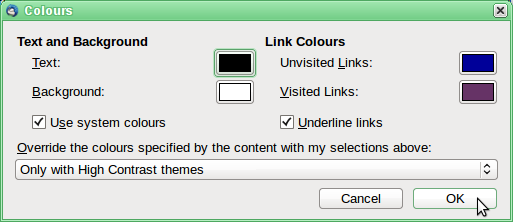
Tools|Options|Display|Formatting→Colours
and there you can set black text on white background. I can't think of any higher contrast than that, but you can choose whatever colours you wish for.
If you want to make message text bigger,
Tools|Options|Display|Formatting→Advanced
For the user interface, the easiest way to choose colours is via a theme. And if the size doesn't suit, then an add-on is the easiest way to adjust that.
More on type sizes: http://xenos-email-notes.simplesite.com/417754775
Izmjenjeno od strane Zenos