Enhancing contrast in Thunderbird 115.3.1 (64-bit) for Mac

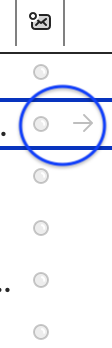
My Thunderbird updated to 115.3.1 (64-bit). Many of the graphical elements are hard to see. e.g. the arrows that show that a message is reply, etc. Is there any way to increase the contrast?
Searches pointed to a Theme Font and Size Changer extension but neither of the two versions shows as compatible.
I also looked for themes optimized for accessibility but didn't find any. If they exist, I'll try them.
My Thunderbird updated to 115.3.1 (64-bit). Many of the graphical elements are hard to see. e.g. the arrows that show that a message is reply, etc. Is there any way to increase the contrast?
Searches pointed to a Theme Font and Size Changer extension but neither of the two versions shows as compatible.
I also looked for themes optimized for accessibility but didn't find any. If they exist, I'll try them.
所有回覆 (2)
Please post a screen shot. Thanks
Couple of examples enclosed.