After updating Firefox to 159.0, two Firefox windows were opened again!

Support,
After updating Firefox to 159.0, two Firefox windows were opened although only one was open at the time before Firefox was closed during a Windows 11 Update! The first window was expected but the one below at the URL was not:
This has happened before. Please address.
All Replies (6)
Hi, I'm a little suspicious that one of your add-ons could be involved.
Tips for checking those: Review installed extensions
If you launch a new window using Ctrl+N, does the Yahoo search page appear? That would indicate that it was set as your home page. To edit that, see: How to set the home page.
If it only appears when you use your Firefox desktop/taskbar shortcut, the shortcut might be "hacked." We can describe how to clean that up if you see a connection there.
Did you find anything so far?
The issue only occurs sometimes when Firefox is updated. I found out the Yahoo search page is set as my Home page.
Thank you for the additional info.
It's normal to get a "What's new" page AND your home page (or previous session restored) after an update, so if you saw that combination, it's normal.
I don't think anyone would intentionally choose that particular Yahoo address as their home page. You could simplify it to just https://www.yahoo.com/ if you prefer Yahoo as your home page.
It should not be normal that when the only one Firefox Window that was open is closed, when it restarts, two Firefox Windows automatically open.
If it wasn't the "What's New" page, which usually is an added tab in your main window, I agree you shouldn't get an unexpected page. That sounds suspicious, which was one reason for suggesting an extension check.
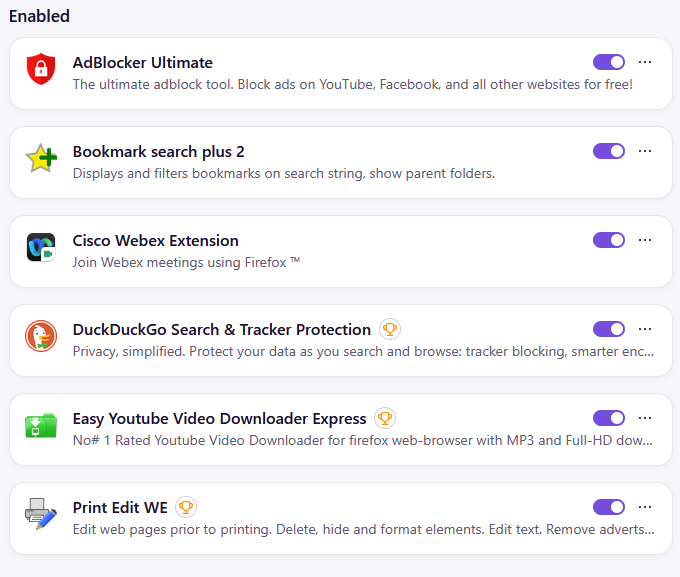
How do I check my Extensions? The issue I described only happens sometimes though when I update Firefox. It would seem like the Extensions I have wouldn't have any effect on what Firefox does when it starts. See screenshot of my Extensions.