


how do you set firefox vpn to start automatically everyting firefox starts.

how do you set firefox vpn to start automatically everyting firefox starts.
الحل المُختار
Hello
Why does FireFox VPN not start automatically when I start FireFox?
All Replies (7)
as an option, if the info on how to automatically start VPN is already there, make it easier to find.
If you mean the Mozilla VPN service rather than a Firefox extension, I’d check the VPN app’s connection settings first. The automatic connection option is usually handled by the VPN itself, not by Firefox starting it with the browser.
If you’re already using the VPN inside Firefox, it would help to mention which version/setup you’re using, because the steps can be different depending on whether it’s the Mozilla VPN app or a browser extension.
الحل المُختار
Hello
Why does FireFox VPN not start automatically when I start FireFox?
Emma Taylor said
If you mean the Mozilla VPN service rather than a Firefox extension, I’d check the VPN app’s connection settings first. The automatic connection option is usually handled by the VPN itself, not by Firefox starting it with the browser. If you’re already using the VPN inside Firefox, it would help to mention which version/setup you’re using, because the steps can be different depending on whether it’s the Mozilla VPN app or a browser extension.
Maybe you should be careful when using AI chatbots to gets answers. The OP was referring to the built-in VPN in desktop Firefox that started rollout in Firefox 149.0 back in March.
Sorry guys, maybe they didn't tell you they added the button "VPN" on the top bar of the Firefox screen. It is greyed out when it is not running, and clicking it turns it green, and gives you a popup that VPN is "ON". But I have to "turn it on" every time I start firefox. I cannot fine any settings for VPN.
And I didn't get my question from and AI, I just tried the click the button that Firefox showed me.
Would you rather I go back to NordVPN? alan a.
Hello
https://support.mozilla.org/en-US/questions/1595791#answer-1835598 Just a question, have you tried, Turn on VPN automatically When I open Firefox.
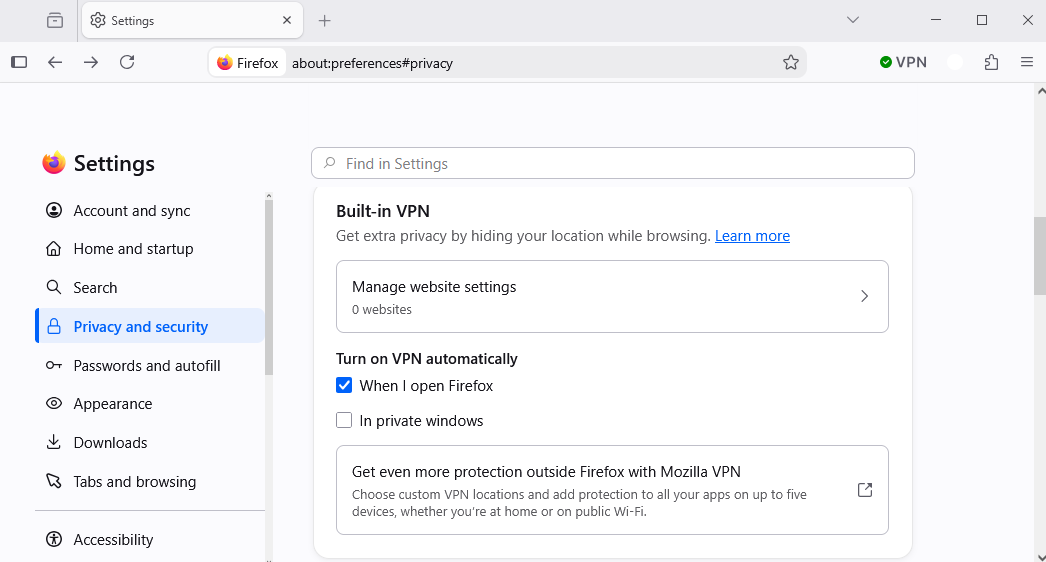
Otherwise.
Product: Firefox Component: IP Protection https://bugzilla.mozilla.org/buglist.cgi?product=Firefox&component=IP%20Protection, you can sort by Updated
[meta] Autostart Firefox VPN https://bugzilla.mozilla.org/show_bug.cgi?id=1990008
How to automatically start VPN A space for users to give product feedback https://support.mozilla.org/en-US/kb/what-mozilla-connect
Modified by Agent virtuel