


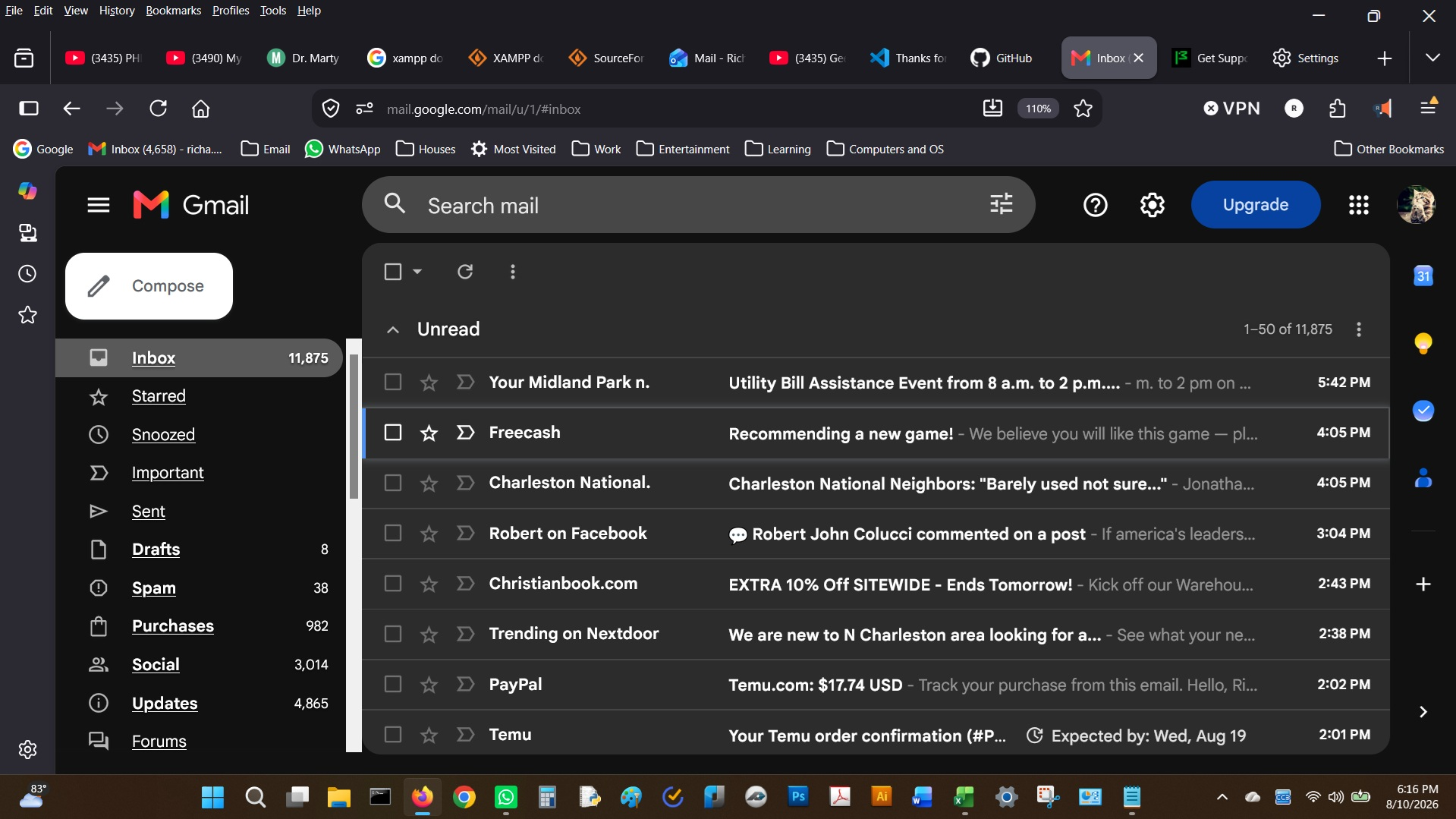
Is anyone else having problems after last update? UI too big for my laptop and most things not adjustable. Almost unusable any way's to fix? Version 153.0.3

Is anyone else having problems after last update? UI too big for my laptop and most things not adjustable. Almost unusable any way to fix? Version 153.0.3 Everything is blocky like on Gmail left side too big and takes up 30% of screen. No way to adjust it.
Top of Screen where menu bar is , home screen options, Mobile Bookmarks and tabs is way to big and forces you to have to use the vertical tabs. I often work with multiple tabs and find it annoying to have to enlarge and shrink the vertical tabs when ever I want to switch tabs. Real Pain in the you know where.
I have been using firefox for many years and Love it. but if these issues persist, I might have to finally begin considering other options.
I would hate having to switch to Chrome. I dislike using that browser even thou most websites are being designed around it, which is inconvenient, but I have tried to tow the line and be loyal to my favorite opensource browser.
Please help. Any suggestions welcome.
[redacted email from community support forum] RE: Firefox Browser Help if you contact directly in subject line so I can easily find it.
Modified by James
All Replies (3)

Thanks for your report.
Maybe you can try pinned tab and tab groups? https://support.mozilla.org/en-US/kb/pinned-tabs-keep-favorite-websites-open https://support.mozilla.org/en-US/kb/tab-groups
Please note you have set zoom factor for website content. So reset that one to 100% from menu to have Gmail in its original size.
The rest of the screen however looks rather inflated — are you sure this is not coming from your system accessibility/sizing preferences that might have changed between updates? Do all your other apps, esp. built in system ones like file explorer and similar look still the same, or you can spot some sizing differences there as well?
It's also possible the system now tells the browser it's running on tablet (or touch device, per se), so if you really don't see any other way this could have been configured, you can always override that in Firefox internals.
Please see Configuration Editor for Firefox how to make that change, incl. warnings highlighted on that page, and then verify what is your value for:
browser.uidensity
This should normally be "0" — your layout looks like "2" though, and you can also force "1" as a compact option if you're so inclined.