How do I transfer Thunderbird from my PC to my Mac?

I have been using Thunderbird on my PC for years and when I got my last PC, I found a article to help me move my files. I am now looking for instructions on how to move my Thunderbird files from the PC to the Mac so I can continue using it as I have been.
All Replies (42)
Download Thunderbird from here if you have not already: https://www.thunderbird.net/en-US/thunderbird/all/
I suggest the esr channel, not the "release" channel, for stability. See here: https://www.thunderbird.net/en-US/thunderbird/all/
Install Thunderbird.
Instructions for moving that you may have read already: https://support.mozilla.org/en-US/kb/moving-thunderbird-data-to-a-new-computer
The concepts are easy: find the Thunderbird folder on your PC, copy it to an external drive, then copy it from the external drive to your ~/Library directory.
You may have to tell Thunderbird on your Mac which profile to use. We'll see when you get there.
Please ask if you need more details.
Thank you. I will follow your instructions and report back.
I have postponed doing this for quite some time as I hate frustration. I have located the files on my PC, downloaded them from OneDrive to my Mac. They were zipped so I unzipped them. My problem is that I can't find Macintosh/ HD/users/Marj/Library. Library isn't there with finder, with Go, or with a search. I know it exists because the Mac copy of Thunderbird shows my profile file there. What am I missing? Thank you.
"Marj" should be all lower-case. But that's probably not the issue.
In the Finder, use the menus: Go > Library or the keyboard shortcut: command+shift+L.
Do you have administrative rights?
The Go menu does not have a "Library" option. In Finder, command+shift+L gives a dull beep. And marj is in lowercase. I believe I have the latest OS. Tahoe 25.6.2. Is there something in my system settings that I preventing those options from working?
I think so. It's my machine and I'm the only user.
I checked "Get Info" on the profile files (there are 2) and they both say I have permission to read or write. I was thinking maybe they were hidden somehow but I guess not.
I'm thinking this is a Mac issue, not a Thunderbird issue?
Permission to read and write certain files does not imply that you have administrator rights.
Did you copy the whole Thunderbird folder or its contents or something else?
It's not a Thunderbird issue. It's just a matter of copying the "Thunderbird" folder to the "Library" folder.
I wrote earlier, but deleted: When Apple restricted access to the library folder years ago, I made mine permanently visible, so it's been a long time since I had to deal with this issue. AI tells me that you must hold down the option key while clicking on the "Go" menu in Finder to see the library option.
AI also tells me that clicking on your home folder and pressing command-j will give you the option of making your library folder permanently visible.
Make the library folder visible, copy the whole "Thunderbird" folder, including the enclosing folder, to it, start Thunderbird, report, and we'll see if there are Thunderbird issues.
This is all making me nuts. The first time I tried using the option key and the GO menu, it worked. I also tried command j (while the Library folder was highlighted) and a menu came up and I clicked on "Always open in List view" . I also checked "Browse in List view." Nothing else on that menu seemed relevant. I am in List view but the file has gone missing again. I can still get the Library option to come up by using the Option GO command but I end up in MacBook Air. That makes no sense at all. I rebooted the computer because sometimes that helps. It didn't. And, yes, I did copy the whole Thunderbird folder from my PC. I really appreciate your help with this. I have successfully copied Thunderbird from an old PC to a new one so I have some idea of what I'm doing.
I used Go to Folder and by entering ~/library, I got there. I replace the entire Thunderbird folder but that doesn't work. Don't I need to replace those files in Profiles?
I replaced the Mac profile files with the pc ones. Didn't help...
I see why that didn't work. It's still looking at the Mac profile file...
What doesn’t work? How does it fail?
command-j is used after you select your home folder, not library. Then you should have an option to make library permanently visible.
If you replaced the Thunderbird folder, there is no “Mac” profile.
Make sure that you replaced the Thunderbird folder.
Open Thunderbird.
Help > Troubleshooting information > about:profiles > set your desired profile as the default
(from memory, pretty sure of the path)
Ah. We're getting close. I've found the about:profiles. It looks like I need to create a new one and set it as the default. I will try that.
Wasn’t the whole point to use your profile from Windows?
mkdeupree said
I have postponed doing this for quite some time as I hate frustration. I have located the files on my PC, downloaded them from OneDrive to my Mac. They were zipped so I unzipped them. My problem is that I can't find Macintosh/ HD/users/Marj/Library. Library isn't there with finder, with Go, or with a search. I know it exists because the Mac copy of Thunderbird shows my profile file there. What am I missing? Thank you.
I am still trying to understand this message because I am not certain about what you copied from Windows, and this gap in my understanding my explain why I do not understand your last message.
Why are you referring to "files" and not a ("Thunderbird") folder?
Why were the files compressed? What compressed them? You? A Thunderbird function that exported only your profile? OneDrive? Something else?
What do you mean that Thunderbird shows your profile file there? Did you search for your profile folder, and Finder found it and said that it was in your library?
A profile is stored in a folder, not a file. Why are you referring to a file?
In the most common installation on Windows, there are two "Thunderbird" directories. Did you follow the instructions to get the right one?
I downloaded the Thunderbird folder (from OneDrive on the PC) to the Mac. OneDrive put everything in a zip file which I unzipped so I have the PC Thunderbird folder on my Mac.
I knew the library files (from downloading Thunderbird) existed on the Mac because when I went into troubleshooting on the Mac and chose Show in Finder (by Profile Folder) it showed up in Finder. And Get Info told me where it was.
I'm sorry I haven't been clear on what I've done. I have replaced the Thunderbird folder that was created when I downloaded Thunderbird on the Mac with the Thunderbird folder from the PC.
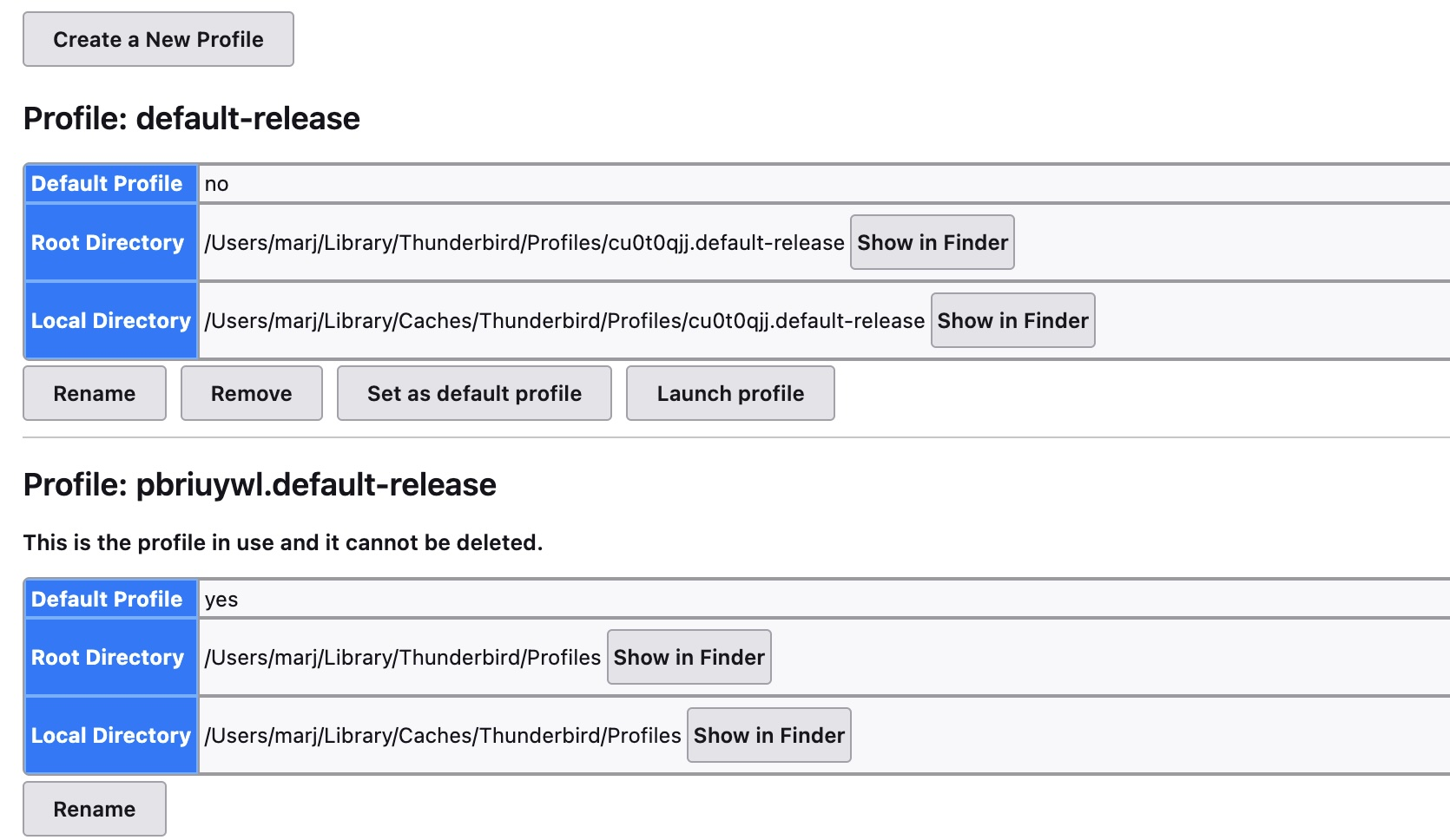
When I went to About:Profiles and created a new profile and set it as default, it still doesn't work. I think I did that wrong. I took a screenshot and added it but I'm not sure it went with my last reply. It is still sitting below this box so I hope it will go this time.
When I am at my home folder (marj), and do command j, I get Show View Options which has nothing to do with Library.
I can tell you're getting pretty frustrated with me and I apologize. I'm truly doing my best.