


Reopening Firefox with the same tabs

Over the past few updates, I’ve noticed an issue with Firefox where it no longer restores my previous session when reopening the browser.
I normally keep four tabs pinned and about five additional tabs open for browsing and work. In the past, I could simply click the X to close Firefox, and when I reopened it, all my tabs that are pinned and unpinned would automatically come back. Recently, this stopped happening. Now, if I close Firefox, it opens with a fresh window instead of restoring my previous tabs.
I’ve already checked the setting under General/Startup, and Open previous windows and tabs is enabled. Because of this issue, I avoid closing Firefox entirely, since rebuilding all my tabs each time has become a hassle.
Is there a way to fix this? Any suggestions would be appreciated.
Thanks :)
Modified by emailmesteve
All Replies (4)
Yes, I also have several tabs pinned and they are a must in all browsers I run. see screenshot There has been a session restore issue with Firefox for sometime, but you can restore as long as your sessions files have not been reset. What do you have Firefox doing when you close it? see screenshot

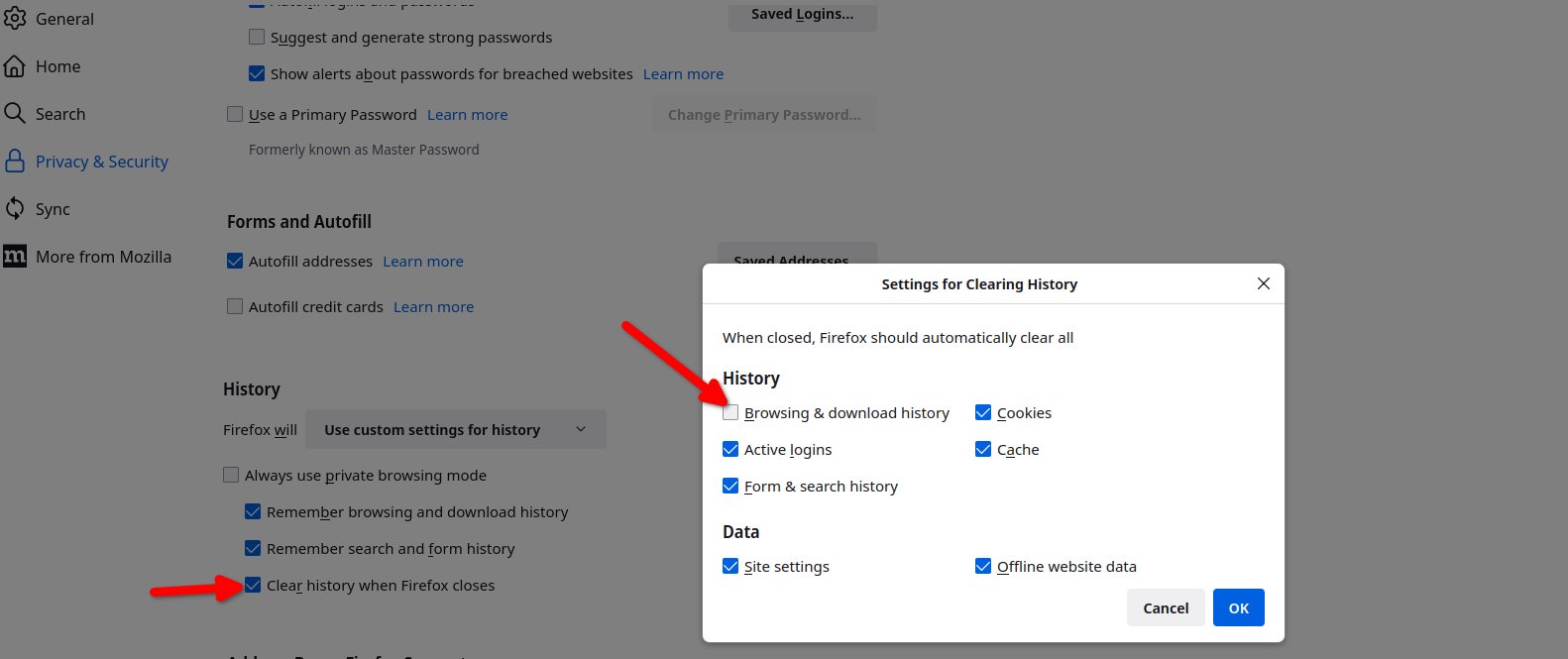
Modified by jonzn4SUSE
Could you check whether either of these are available (not hidden or grayed out):
- "3-bar" menu button > History > Restore Previous Session
- (menu bar or Alt+S) History > Restore Previous Session
If they are missing or grayed or you used either one, the next thing to check is either:
- "3-bar" menu button > History > Recently Closed Windows
- (menu bar or Alt+S) History > Recently Closed Windows
If you find the missing window on the closed list, one of two things happened:
(A) A different window closed after your main window while Firefox was shutting down.
But usually you would know this because the other window typically doesn't close itself.
(B) Firefox never shut down because a different window (not visible on screen?) kept Firefox open.
Sometimes Firefox saves wacky coordinates for a window that positions it offscreen, while other times, a window moves to a different Windows desktop.
Either way, check Firefox View to see whether there's a non-visible window on the Open Tabs panel: Firefox View - Access pages from open tabs, recently closed tabs, tabs from other devices and browsing history.

My last session not only didn't open as usual, but the option to "Reopen all Previously Closed Tabs" does not open anything (so it must think nothing was open?). It also wiped out my pinned tabs !
This is the reason I keep switching browsers !!!!! Now Firefox is doing the same thing Chrome, Edge, Vivaldi, etc. have ALL done to me, even though I always check all the boxes correctly.
Firefox is set with all the proper boxes checked and unchecked ... to re-open last session's tabs and not clear them when closing. I had 20 tabs open with things I was working on, including grouped tabs that I now have to open individually.
This is sad, again.
Hi Marc, let me repeat one of my earlier comments in case you didn't get to it when you read this thread:
Check either of these:If you find the missing window on the closed list, one of two things happened: (A) A different window closed after your main window while Firefox was shutting down. But usually you would know this because the other window typically doesn't close itself. (B) Firefox never shut down because a different window (not visible on screen?) kept Firefox open. Sometimes Firefox saves wacky coordinates for a window that positions it offscreen, while other times, a window moves to a different Windows desktop. Either way, check Firefox View to see whether there's a non-visible window on the Open Tabs panel: Firefox View - Access pages from open tabs, recently closed tabs, tabs from other devices and browsing history.
- "3-bar" menu button > History > Recently Closed Windows
- (menu bar or Alt+S) History > Recently Closed Windows
If you don't have any closed windows you can reopen, and you don't have any non-visible windows showing in Firefox View, then it sounds like the file was cleared or Firefox started up in a different profile (but in the case of a different profile, lots of data would be missing).
While Firefox is fairly reliable with restoring sessions once you discover its idiosyncrasies around closed windows, when it fails, you have a limited time to recover old data. Could you start by making a backup of your existing session history files? Here's how:
Do not exit Firefox, or if you closed it, don't re-open it.
(1) To open your profile folder...
If Firefox is still running:
You can open your current Firefox settings (AKA Firefox profile) folder using either
- "3-bar" menu button > Help > More Troubleshooting Information
- (menu bar) Help > More Troubleshooting Information
- type or paste about:support in the address bar and press Enter
In the first table on the page, find the Profile Folder row and click the "Open Folder" button. This should launch Windows' File Explorer listing the contents of your current profile folder.
If Firefox is closed:
Type or paste the following into the Windows Run dialog or the system search box and press Enter to launch Windows Explorer:
%APPDATA%\Mozilla\Firefox\Profiles
In that folder, do you see a semi-randomly-named folder? If so, click into it. If you find multiple such folders, find the one that was most recently updated.
(2) Copy out session history files
In your profile folder, double-click into the sessionstore-backups folder. Save all files here to a safe location such as your Documents folder.
(3) What files did you find?
The kinds of files you may find among your sessionstore files are:
- recovery.jsonlz4: the windows and tabs in your currently live Firefox session (or, if Firefox crashed at the last shutdown and is still closed, your last session)
- recovery.baklz4: a backup copy of recovery.jsonlz4
- previous.jsonlz4: the windows and tabs in your last Firefox session
- upgrade.jsonlz4-build_id: the windows and tabs in the Firefox session that was live at the time of your last update
Sometimes you can tell from the last modification time which one will have your missing tabs, but not always.
Optional File Contents Preview
These compressed files are a pain to view, so I created a tool to list out their contents. If you want to try that, you can open either of the following pages:
- On my site: https://www.jeffersonscher.com/ffu/scrounger.html
- On Github: https://jscher2000.github.io/Firefox-File-Utilities/scrounger.html
Drag and drop a session history file onto the large box to decompress it. Then click the "Scrounge URLs" button to extract the contents into a readable format.
If you don't get a list within 15 seconds, that probably means the script is caught in a loop. You may need to close the tab to avoid a tab crash and then try again in a new tab.
If you get a useful list, use the "Save List" button to archive it as a web page of clickable links for future reference, in case no other approach is successful.
If you decide you want to roll your Firefox back to one of the older sessions, see the following articles for the steps: How to restore a browsing session from backup.