Firefox Sync is a total nightmare.
Instead of syncing my current settings, sync just overwrote them with an old, outdated copy from another device, completely ruining my addons, bookmarks and various other settings. I managed to restore the bookmarks, but is there really no proper way to undo this or prevent such thing from happening in the first place? Is there no way to control if I want to sync my setting TO the server or FROM the server? How such a vital decision is even made then and why wouldn't there be a way for a user to control that? This is so disappointing :(
All Replies (6)
Hi Dmytro
Firefox Sync is designed to keep bookmarks, passwords and other data in sync between multiple copies of Firefox. When it does this, it makes sure that the latest data is synced.
There several element is a waypoint between the copies of Firefox that your have connected to Firefox Sync.
I hope that this helps.
Hey Paul, thanks for the reply. However, this doesn't clear up any of my questions or concerns.
Besides, my problem is that there isn't really a clear way for me to make sure that only the latest data is synced. It just syncs whatever the server has onto my device without any way for me to control it besides switching parts on or off. Most importantly, there is no way to undo those changes, unless it's the bookmarks and only the bookmarks.
Why not have the same kind of backup for the rest of the settings or all the other elements you can sync? Or just have one single copy to return to in a case of an unfortunate sync like mine? Better yet, have a way to review the data that's about to be synced?
Even disregarding all these and previous questions, the main thing that makes syncing process a total nightmare is the fact there is no way to clear whatever is currently stored for syncing, unless you count deleting user's account as a solution.
If you use the "forgotten password" option, it will clear what is currently being synced between devices.

Firefox are being deliberately misleading about syncing failure. They refuse to admit that their sync feature simply does not function. As soon as you export and import all your data, its is lost, period. All my extension data was gone. Here is the false explanation Firefox put out, Check Sync Settings >
Verify Add-ons are Selected: Open the Firefox Menu (☰) > Sync > Ensure that Add-ons is checked
This is total nonsense. There is no such feature for selecting Add-ons or extensions. So, why are Firefox giving false information?
FIRST THING: Firefox/Mozilla has been/is my preferred browser since before 2000. I have always liked MOST of it. Strangely, the feature I like most is that FF still uses the old school MENU BAR, which few competitors have anymore. If you are really detail savvy, it is unequaled in assisting your online work with a site or across sites. Keep it and I'll never move my allegiance.
NOW WHAT I DO NOT LIKE: SYNC! I have one main machine and I DEMAND that it's data set saved is the one I go to with any other device. 95% of ALL things are on this PC. Any other device MUST NOT change that data set unless I add or change it myself individually. Unfortunately, SYNC is not nearly as good as it should be.
I have SYNC turned off due to the issue on this query. Several years ago a SYNC blew my stuff to the ether, so now I save my current data set to a named FF recovery folder so it would be "clean" before a SYNC could occur. Now if SYNC, sinks, I can clear and reload... but this is NO FUN!! Better ways...
Why can't I specify a specific data set to be accessed or saved? When I save from any PC, I want to keep it separated from others. If I have a problem with the main PC, install a new OS or a setup a new PC, I MUST be able to specify a specific data set I know is right for this machine. I want a specific SYNC folder separate from the saved data sets. If I want to SYNC I get to say so and to where.
Modified by Jopower
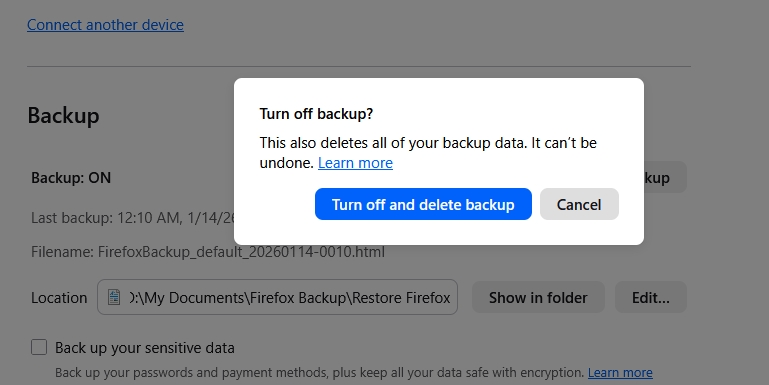
Now there's another wrinkle: If I try to turn Backup off, it demands that my current backup be deleted!!!
Now must copy and hide the clean pre-SYNC backup if I want to go back to it. WHY?
See attached screen shot attached: