


Newly installed Thunderbird on new PC's not receiving or sending email

I have installed Thunderbird on a new Lenovo PC using the latest version of Windows. I have copied the settings manually and correctly from a laptop in to the settings for the accounts on the PC. Thunderbird does not give any errors for collection of email though none are appearing in the inbox. There are messages on the server waiting to be collected.
There is a timeout on the SMTP when trying to send messages so no messages are sent.
I have checked all the settings and they are as follows: POP account port 110 smtp port 587 Using START and normal password authentication for both.
I have tried numerous other permutations of configurations as well as restarting Thunderbird after every change. As I mention these are the identical settings used on the laptops which the PC's are replacing. The PC is connected to the internet via ethernet cable and the internet functions fine.
Any ideas out there or anyone having had a similar experience and found a resolution?
All Replies (5)
That is one reason I prefer to copy profiles instead of manually entering account info. All I can suggest is to post screenshots of incoming server setting pane and SMTP server settings pane and complete text of any error messages. With that, someone here may have suggestions. Thank you
Hello David, Many thanks for your response. I don't think the screenshots reveal anything untoward as they function perfectly well in the existing setup on the laptop.
I am not at the PC at the moment to get a screen shot of the error message but its a timeout error message that is appearing. I had gone into the configuration in the Thunderbird settings and extended the time out from 100 to 300 but to no avail. I am trying to resolve the problem an want to be sure that there is nothing in Thunderbird itself which may be the issue before assessing any firewall or anti virus software issues.
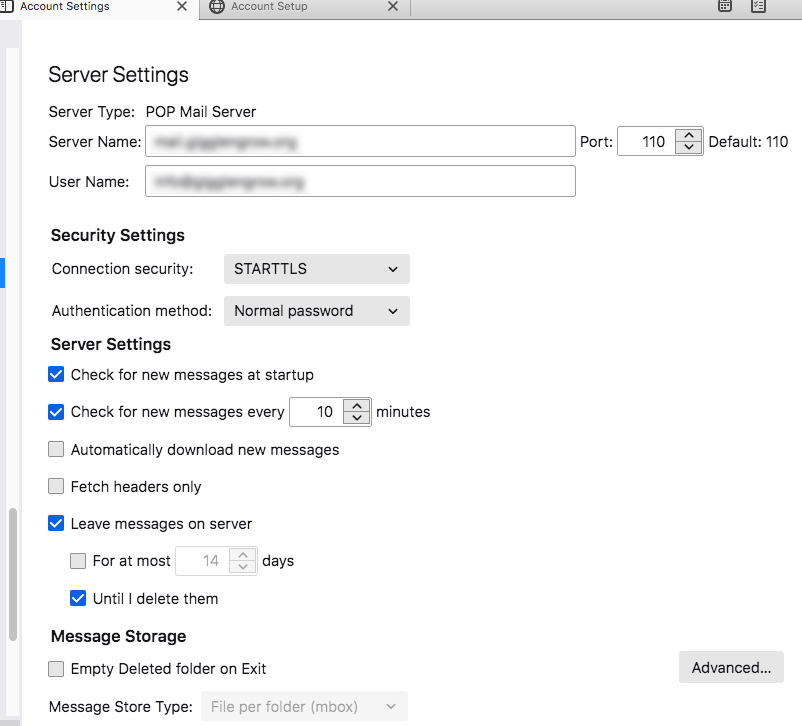
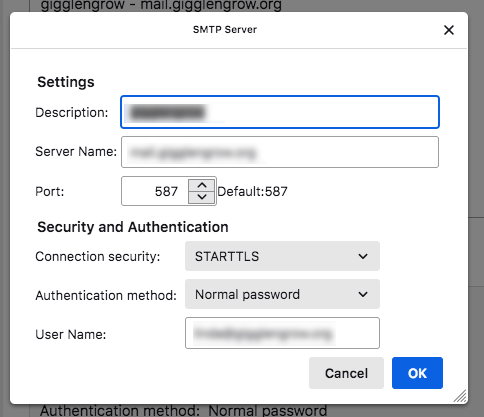
The STARTTLS setting for port 110 seems unusual. Since you are not sharing the email domain, nobody here can give other suggestions. But, since the settings you posted work fine elsewhere, I'm at a loss.
Please do not hide server name settings as they are vital. They are not personal data and most server settings are used by hundreds of thousands of people and are checkable on the internet. The important part that does need to be erased is the first part of username - the bit before the '@' in email address needs to be erased.
You say Thunderbird is newly installed, so maybe your Firewall is causing the problem.
Check Firewall
- Exit Thunderbird
- Access Firewall
- Set up thunderbird.exe as an allowed program, otherwise it may block access to internet.
Pop account using port 110 is not exactly secure.
Usually a secure Port used for pop is: 995 Connection Security: SSL/TLS Authentication Method :Normal Password.
Hello Toad-Hall, Many thanks for your input.
The domain name is gigglengrow.org. The mail server being used is mail.gigglengrow.org. All of these details function perfectly well on the current laptops being used. I didn't think that they were relevant to the issue at hand though I am interested to know if they could have been.
When I am in next at the PC's in question then I shall add thunderbird.exe to the allowed program list. Hopefully that will resolve things.