Suddenly I have 2 folders both called 'SENT' in Thunderbird - one is empty and I can't delete it. Help

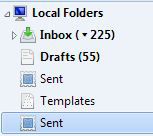
Suddenly I have 2 folders both called 'SENT' in Thunderbird Local folders. One is a normal 'Sent' folder with all the normal messages, the other is tagged with the same icon, at the same level under Local folders, but does not contain any messages and I can't delete it. Help. The highlighted Sent folder in the image is the current/normal one
All Replies (1)
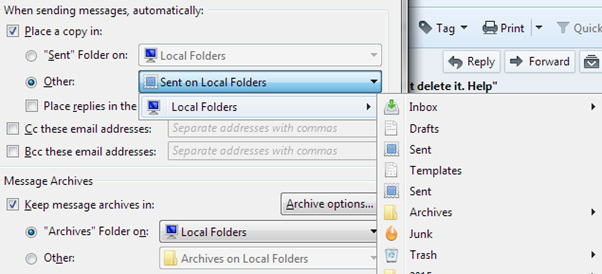
Thanks for responding. Just to make it clear - you're right I never use the newsgroups. I have two email addresses, business and personal, but they don't need to be separated at the Inbox (the only separation I make is individual messages to 'Supplier' or 'Client',etc: folders I have created, which I do when they come in). If I turn off Global Inbox (I assume in 'Account Settings' somewhere) won't they come in to separate Inboxes? ATM in 'Account Settings > Copies and Folders' both Accounts are set on 'Other> Sent on Local folders>Local Folders' (see screenshot) but without specifying a particular folder within that drop down group (which includes ALL my folders). If I choose the Sent folder I know has currently got all the massages in it, will it remove /or can I delete the other sent Folder?