


Windows 10 reached EOS (end of support) on October 14, 2025. If you are on Windows 10, see this article.

ابحث في الدعم

Avoid support scams. We will never ask you to call or text a phone number or share personal information. Please report suspicious activity using the “Report Abuse” option.

Learn More
المُؤرشفة

Another YouTube won't playback on Firefox problem [my solution]

fade2gray

Recently (since about FF 28) I've been getting the "An error occurred, please try again later" message when trying to view YouTube videos, i.e. the video will play for a few seconds before stopping and displaying the error message.

I went through all the motions of searching for solutions like clearing cookies and running Firefox in safe-mode etc. etc., but with no luck. Then I accidentally stumbled on my solution - the problem disappeared when I had headphones plugged in to my PC (in fact, it doesn't have to be headphones - even a headphone extension cable will do, just as long as something is physically plugged into the headphone jack).

OK, so I found a solution, but I don't understand why it's a problem for Firefox in the first place (it doesn't happen with IE11), any words of advice?

Thanks.

Recently (since about FF 28) I've been getting the "An error occurred, please try again later" message when trying to view YouTube videos, i.e. the video will play for a few seconds before stopping and displaying the error message. I went through all the motions of searching for solutions like clearing cookies and running Firefox in safe-mode etc. etc., but with no luck. Then I accidentally stumbled on my solution - the problem disappeared when I had headphones plugged in to my PC (in fact, it doesn't have to be headphones - even a headphone extension cable will do, just as long as something is physically plugged into the headphone jack). OK, so I found a solution, but I don't understand why it's a problem for Firefox in the first place (it doesn't happen with IE11), any words of advice? Thanks.

Modified by fade2gray

All Replies (2)

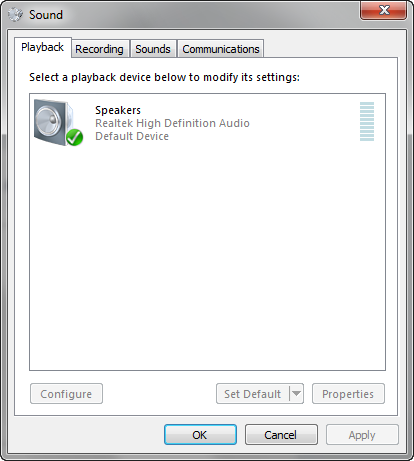
What is the default audio device if you check that in the volume mixer via its icon on the Windows Taskbar?

Default Device: Realtek High Definition Audio
Modified by fade2gray