


Join us to show up for other Firefox users 🦊. Earn fun badges and Mozilla swag vouchers! Find out more: https://mzl.la/askafox150

Windows 10 reached EOS (end of support) on October 14, 2025. If you are on Windows 10, see this article.

Search Support

Avoid support scams. We will never ask you to call or text a phone number or share personal information. Please report suspicious activity using the “Report Abuse” option.

Learn More

TB for Mac - lost connection to all my email accounts and all my email records

  • Akukho zimpendulo
  • 0 zinale nkinga
  • Open

I had to restart my Mac. When TB restarted during relaunch of the Mac, it was like TB starting fresh. It didn't display my email accounts, or my folders with saved emails, etc.

I quit TB and looked for it in my Applications folder - and I found two versions of TB. Inside the Thunderbird folder was version 140.9.0esr. Outside the Thunderbird folder was version 150.0. See attached screen grab.

I thought I should try launching the newer version (which was outside the folder). So I moved the 140.9.0 version to the trash, then launched the newer version – and it had the same problem. It looked like I was starting TB from scratch.

Next I quit TB (the newer version) and moved the older version out of the trash and back into the TB folder and double-clicked on it. A dialog box popped up saying that the file is damaged and can't be launched.

So I tried launching the newer version again, and it still looks like starting from scratch.

I really hope somebody can help me solve this. I can't access any of my email accounts or any of my stored emails. I use email for work (as most of us do), so this is crippling me.

Thanks in advance for any help.
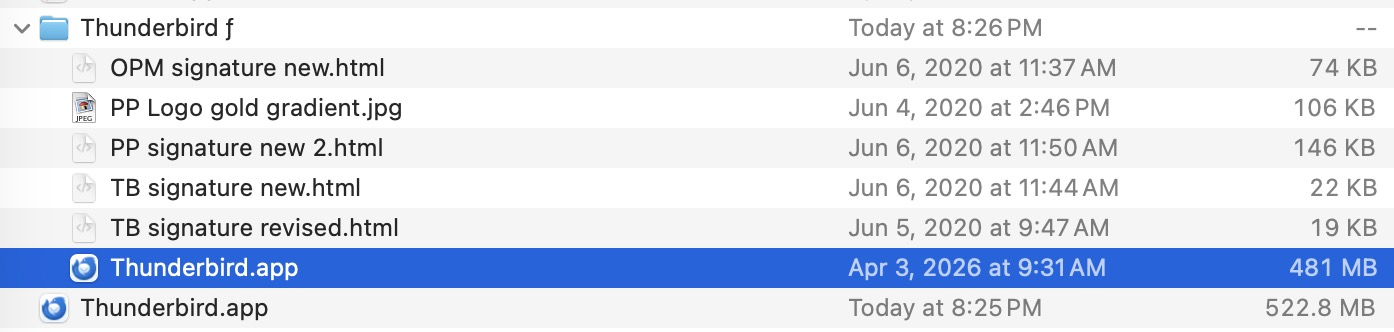
I had to restart my Mac. When TB restarted during relaunch of the Mac, it was like TB starting fresh. It didn't display my email accounts, or my folders with saved emails, etc. I quit TB and looked for it in my Applications folder - and I found two versions of TB. Inside the Thunderbird folder was version 140.9.0esr. Outside the Thunderbird folder was version 150.0. See attached screen grab. I thought I should try launching the newer version (which was outside the folder). So I moved the 140.9.0 version to the trash, then launched the newer version – and it had the same problem. It looked like I was starting TB from scratch. Next I quit TB (the newer version) and moved the older version out of the trash and back into the TB folder and double-clicked on it. A dialog box popped up saying that the file is damaged and can't be launched. So I tried launching the newer version again, and it still looks like starting from scratch. I really hope somebody can help me solve this. I can't access any of my email accounts or any of my stored emails. I use email for work (as most of us do), so this is crippling me. Thanks in advance for any help.
Ama-screenshot ananyekiwe

You must log in to your account to reply to posts. Please start a new question, if you do not have an account yet.