


Firefox crashes

bp-ba684caf-9a8a-4af5-a867-950ef2130524
Mozilla and IE crashed after updating windows XP service pack3. Both opens in safe mode but donot get launched in normal mode. I have uninstalled program and also reinstalled them 3-4 times. but no result. i have installed firefox 25. I have also disabled add ones and other programs.
Hemant
被選擇的解決方法
Thanks a lot for prompt reply. Unfortunately it didn't solve my problem.
As this happened after updating windows. What I did was --- 'start -- control panel -- add and remove software -- checked show updates box on the top -- uninstalled last culprit updates --- restart --' This solved my problem
從原來的回覆中察看解決方案 👍 0所有回覆 (2)

The crash id is invalid.
Provide the crash id starting with bp-
Try Firefox Safe Mode to see if the problem goes away. Safe Mode is a troubleshooting mode, which disables most add-ons.
(If you're not using it, switch to the Default theme.)
- On Windows you can open Firefox 4.0+ in Safe Mode by holding the Shift key when you open the Firefox desktop or Start menu shortcut.
- On Mac you can open Firefox 4.0+ in Safe Mode by holding the option key while starting Firefox.
- On Linux you can open Firefox 4.0+ in Safe Mode by quitting Firefox and then going to your Terminal and running: firefox -safe-mode (you may need to specify the Firefox installation path e.g. /usr/lib/firefox)
- Or open the Help menu and click on the Restart with Add-ons Disabled... menu item while Firefox is running.
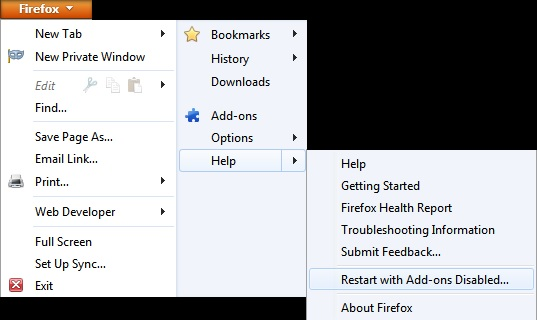
Once you get the pop-up, just select "'Start in Safe Mode"
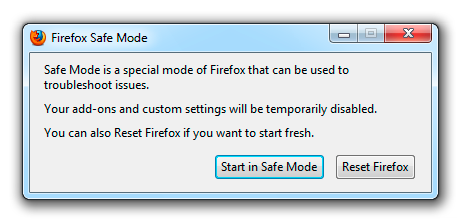
If the issue is not present in Firefox Safe Mode, your problem is probably caused by an extension, and you need to figure out which one. Please follow the Troubleshoot extensions, themes and hardware acceleration issues to solve common Firefox problems article for that.
To exit the Firefox Safe Mode, just close Firefox and wait a few seconds before opening Firefox for normal use again.
When you figure out what's causing your issues, please let us know. It might help other users who have the same problem.
Thank you.
選擇的解決方法
Thanks a lot for prompt reply. Unfortunately it didn't solve my problem.
As this happened after updating windows. What I did was --- 'start -- control panel -- add and remove software -- checked show updates box on the top -- uninstalled last culprit updates --- restart --' This solved my problem