


The operation cannot be completed because some items had to be skipped.

"The operation can't be completed because some items had to be skipped. For each item, choose File>Get Info, make sure "Locked" is deselected, and then check the Sharing and Permissions section. When you are sure the items are unlocked and not designated as Read Only or No Access, try again."
"The operation can't be completed because some items had to be skipped. For each item, choose File>Get Info, make sure "Locked" is deselected, and then check the Sharing and Permissions section. When you are sure the items are unlocked and not designated as Read Only or No Access, try again."
所有回覆 (1)
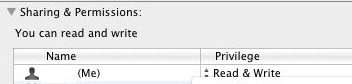
Try this: File >Get Info > Sharing & Permissions > clicked the + and add (Me) from the popuplist and selecte Read & Write.
Troubleshooting permissions issues in Mac OS X
BUT FIRST see this : https://support.mozilla.org/en-US/questions/886995
thank you
Please mark "Solved" the answer that really solve the problem, to help others with a similar problem.
由 ideato 於 修改