


HP C4795 printer will not print in firefox browser but will in IE

I have an HP C4795 printer and HP windows 7 and the printer will not work using firefox. it works fine in IE. I had trouble with firefox crashing yesterday so i uninstalled and reinstalled and printer won't work. worked fine in firefox before my ordeal yesterday.
選擇的解決方法
I see you started another question thread - https://support.mozilla.com/en-US/questions/888892 - so I guess your problem isn't resolved.
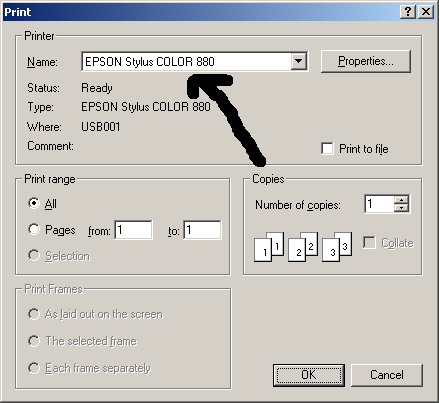
If it is trying to print to an XPS file, your printer isn't selected as the destination for print. You need to select you printer in the Printer - Name box. See the screenshot.
所有回覆 (5)
This w0uld not open. It said Connection failed the system returned (110) connection timed out. I tried it at least 6 times and would shut down computer a d restart and try again.
Give it a try later, it looks like the MozillaZine KnowledgeBase server is down, again.
Does anything happen when you try to print something thru Firefox?
Does the web page appear in Print Preview? If so, can you print from the Preview window?
Yes, I guess Firefox being down was the problem, should have figured that out when i uninstalled firefox and reinstalled it with no success on curing the printing problem.
選擇的解決方法
I see you started another question thread - https://support.mozilla.com/en-US/questions/888892 - so I guess your problem isn't resolved.
If it is trying to print to an XPS file, your printer isn't selected as the destination for print. You need to select you printer in the Printer - Name box. See the screenshot.