


Inbox is empty

This morning, my email Inbox is empty. I use Thunderbird for four email accounts, and three of them are fine, but the fourth one has an empty Inbox this morning. I didn't (intentionally, anyway) move the emails anywhere, and they do appear to be in the All Mail folder, so I didn't lose them entirely. But I keep my emails mostly in my Inbox and they aren't there anymore.
Any ideas what happened to make them disappear and how I can get them back to the Inbox?
Thanks!
所有回覆 (8)
Did you activate the Quick Filter toolbar by chance?
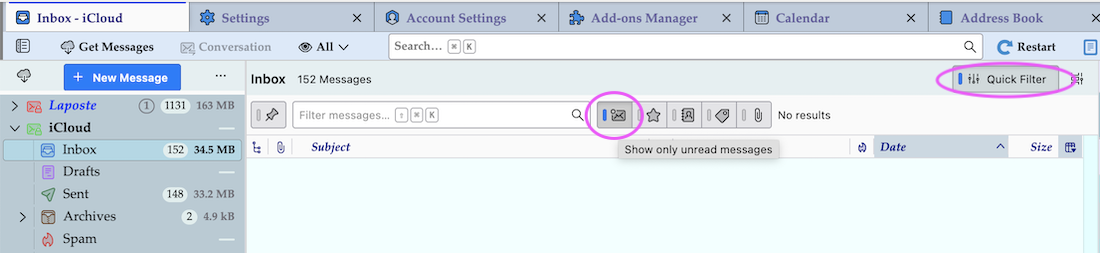
Not that I'm aware of. My display looks different from yours, but the Quick Filter box above my Inbox might have had the blue vertical bar set. Honestly, I don't know. I think I tried clicking it several times but nothing changed. I like your Inbox display better than mine. How do I get that one?
The Inbox in my screen shot looks different from yours, probably because I have activated the quick filter "Show only unread messages" in order to illustrate possible unwanted effects of those filters on the message list in the "Thread Pane". My Inbox doesn't contain unread messages, so the thread pane is empty. But my Inbox is NOT empty as you can see easily. Can you please do a similar screen shot showing your empty Inbox? Which Thunderbird version do you use?
由 Mapenzi 於 修改
Unfortunately, I can't show you the empty Inbox. I pulled a bunch of emails from the All Mail folder back into the Inbox so I could get back to using Thunderbird like I'm used to. Sorry.
But the whole format of your Inbox is different from mine. It doesn't have anything to do with what email are or aren't there; it's the layout that's different. Your layout looks like an Outlook Inbox.

Something similar has just happened to me. An inbox has reduced to only four messages. They are different types. A search shows the other emails are still in existence. I do not have an all emails folder.
@JLWE did you have a look at my screen shot above? Is the Quick Filter toolbar activated in your Inbox?

Thank you. Your screen shot shows to click the envelope. When I do this it shows no emails. When I click again only the four emails plus those which have come in since show. I think I have found all the past Inbox by using search but cannot see how to return them to the Inbox. I would like to be able to see them as I use the Inbox as reminders of things to be done.
ju.col said
Thank you. Your screen shot shows to click the envelope.
No, my screen shot should NOT induce people to "click the envelope". It should demonstrate how an erroneously activated Quick Filter toolbar can hide messages and make users think that they lost them.
I do not understand the problem of your Inbox displaying only four messages. Maybe a screen shot of the folder pane and this Inbox will give more information.