


Automatically deleting emails from server when downloaded into Thunderbird

When email downloads from my internet server to thunderbird how do I indicate that the message is to be deleted from the server. ie I dont want the message to be in two places . At the moment after reading the email and saving it to a folder I have to log into my internet provider and delete the email.
所有回覆 (5)
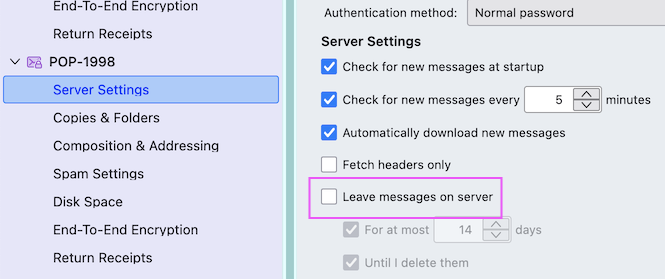
I presume that your email account is set up with the POP protocol. Click on the App button ≡ in the upper right corner > Account settings > Server Settings > Server Settings and uncheck ▢ "Leave messages on server" (see image)
My Thunderbird is set up with the map protocol. I presume from you message I need to change it to the Pop protocol. How do I do that? thanks
No, you needn't switch to the POP protocol. Using the IMAP protocol means that when you delete a message in an email client such as Thunderbird, it will automatically be deleted from the server, too. Changes like deleting a message you make in Thunderbird are replicated on the IMAP server and all devices which are connected to the server. https://support.mozilla.org/en-US/kb/difference-between-imap-and-pop3
由 Mapenzi 於 修改
Many Thanks for your help. Much appreciated. Regards Brian Rummins
Imap accounts can only display whatever is on the server. They are like a mirror image of server.
When you delete an email make sure it goes into the imap Trash folder so the server also puts email in server Trash folder.
Many servers will auto delete emails the Trash folder after a period of time. They do vary but eg: gmail do it after 30 days as it gives you time to save an email if deleted in error.
Also periodically compact the Inbox, Drafts and Spam to ensure old traces of emails are properly cleaned up. You should compact any folders which get emails either deleted or moved to another folder.