


I need help adjusting my adblocker settings

I'm being blocked from accessing an online publication I subscribe to unless I remove an ad blocker. When I complained, I got this response: "The service we use for logins and subscriptions, Piano, has been flagged as a tracker by a widely used open source tracking list, so to access your account information or benefits on the site, you will need to slightly loosen your browser's tracking restrictions that apply to the domain piano.io - how this is done varies quite a bit based on what browser/extension is being used to apply the restrictions." I'm using Firefox v149 on a 4.5yo MacBook Air. I have several ad blockers installed (probably redundantly: AdBlocker Plus, AdBlocker for Facebook, AdBlocker Ultimate, and Ghostery AdBlocker). I have no idea what I need to do to loosen Firefox's tracking restrictions that apply to piano.io. Can anyone help me out? Thanks in advance!
所有回覆 (5)
Hello They are telling you to disable Adblock for that page, go to the page and turn off Adblock. Thanks
由 GerardoPcp04 於 修改
So, I disabled AdBlocker Ultimate on that page, but am still getting this message: "You will need to relax strict tracking protection in your browser to continue."
Enhanced Tracking Protection is a collection of Firefox features that protects your privacy by blocking trackers that follow you online to collect information about your browsing habits and interests. It also includes protection against harmful scripts.
If a site seems broken, you can try turning off Enhanced Tracking Protection for that website:
- Click the shield
 icon at the left of the address bar.
- At the top of the panel, toggle off the Enhanced Tracking Protection switch
 . The site will be added to your Enhanced Tracking Protection exception list, allowing trackers on it, and the page will reload automatically.
-
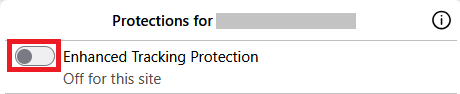
This will allow trackers to load on that website while keeping you protected on other sites. To learn more, see Enhanced Tracking Protection in Firefox for desktop.

I need to block the ad blockers to be able to read Haaretz on archive.is How can I do it? (My computer speaks French)
Thank you
Paola Canarutto
pcanaru1 said
I need to block the ad blockers to be able to read Haaretz on archive.is How can I do it? (My computer speaks French) Thank you Paola Canarutto
Hi, please ask a new question for this.