


Is the Prox-Media icon in my taskbar malware?

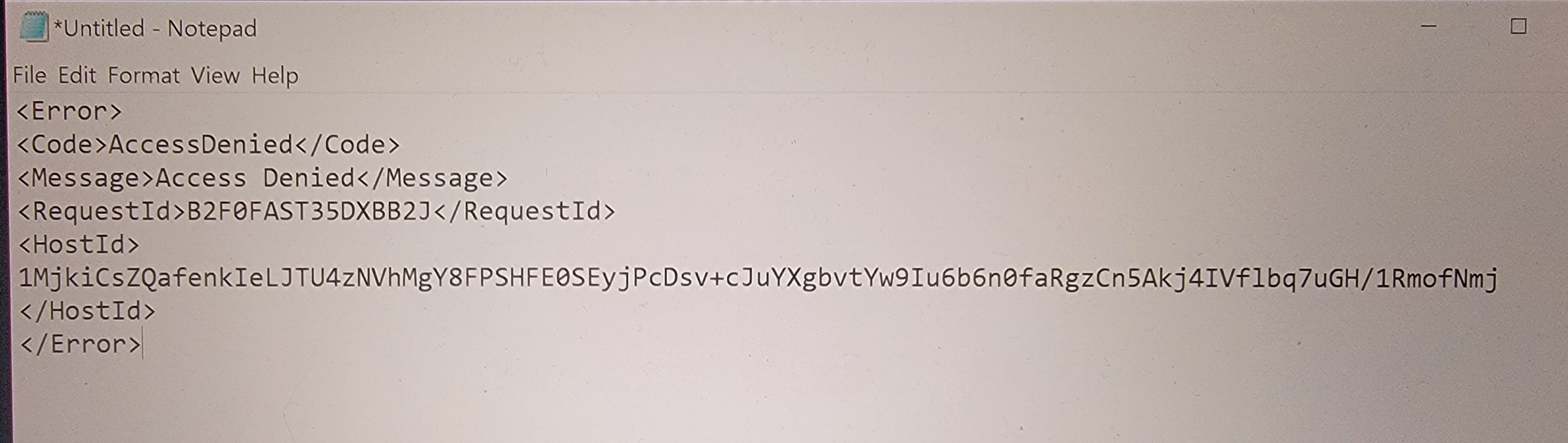
I'm sending this from my phone. My desktop FF (Win 10) suddenly displayed a black wireless globe type icon called Prox-Media pinned to my taskbar. I can't find the app on my system, though, but the full path leads it to a firefox.exe file. Before my brain kicked in, I'd clicked on the icon right after noticing it, and Firefox came up with the attached error message displayed.
"Prox-Media" comes up nowhere in my searches - not as legit, not as a virus - just no results. Can you help?
I have a paid AVG account and I ran a deep scan but it found nothing.
所有回覆 (12)

Interesting... I would run this to see what's set run when you log into windows. https://learn.microsoft.com/en-us/sysinternals/downloads/autoruns
What happens if you just delete it?
THANK YOU for your reply! There are 6 exe's to run and I wasn't finding the recommendations on which was ideal, so I ran only the autoruns.exe. Researching the yellows revealed no real issues, and the pinks don't seem to be anything either, but I've attached jic.
I was tired last night and am kicking myself for clicking on anything unfamiliar; I have so much locked down on my system and browser (I'm no techie, but I used to be, and I still consider myself decently informed and scam savvy), and I do nothing on the internet that doesn't involve a common, legit site. Clearly the shortcut to firefox.exe was to get me to click and run whatever that was, although I'm not noticing anything different today.
Oh, and I did delete the shortcut last night, rebooted after the deep scan and it has not reappeared.
Again, pink items attached, and thank you.

Can you inspect the properties of that icon via the right-click context menu?
It's deleted now but right-click only allowed Unpin and Close. When I did find the path for the icon, as I mentioned above, it led to firefox.exe.
How does deleting a shortcut off my taskbar solve my problem?
An item with no explanation of its origination or purpose, seemingly unrelated to Firefox yet setup to execute Firefox, brought up an unexplained error message. What are the odds that it was innocent? I'm only semi-reassured that Autorun and the deep scan don't see anything. Would those unerringly detect malware?
If it was legit, why do searches for it come up empty?
Sorry, I guess the lack of explanation for what it is and what the error message means to me that my problem isn't solved.
cor-el said
Can you inspect the properties of that icon via the right-click context menu?
You deleted the icon and so what more can we do?
I guess I thought someone might be able to provide context or insight into what it might mean that an icon that appeared unexpectedly, that doesn't seem to exist on the internet, executed Firefox, as well as to potentially translate the resulting error message.
I checked the properties prior to deletion; it was only a shortcut to Firefox. It had come into existence 10 days prior. It didn't live as an app anywhere. I might remember some other detail if there's something specific you are looking for.
If the Prox-Media icon was legit, why do searches for it come up empty? And what does the error message potentially mean?
I appreciate your effort to help - thank you!
If you try to open the same URL in more than one tab then you may have the "Switch to tab" feature preventing that. You can remove the checkmark on "Open Tabs" in the location bar settings to disable "Switch to tab.
The location bar drop-down list can show history items, bookmarked pages, pages opened in tabs, top sites, and search suggestions.
You can set what suggestions show when you enter an URL in the location/address bar.
Settings -> Search -> Address Bar — Firefox Suggest:
Browsing history
Bookmarks
Clipboard
Open tabs
Shortcuts
Search engines
Thank you for the reply. I wasn't trying to open the same URL in multiple tabs. I clicked on the newly-appearing Prox-Media shortcut in my taskbar, it brought up Firefox, and the error message (see my OP) appeared within the content area of the browser. I'm trying to find out if that error message is indicative of a sinister script, ie., since I don't know what Prox-Media is and can find nothing about it in my research.
Okay. Go through those steps again to bring up Firefox via that proxy thingy shortcut and then look at the processes to see if there's something that stands out using this.
https://learn.microsoft.com/en-us/sysinternals/downloads/process-explorer