


can no longer sign in to gmail
I can't sign in to gmail as I used to for years. (It works ok when I use Private Browsing, but that's inconvenient.)
WHAT USED TO HAPPEN: when I was at the sign in page, my password manager (Dashlane) filled in the username and then a screen asking to use the passkey. I said yes, and got in to Google with no problem.
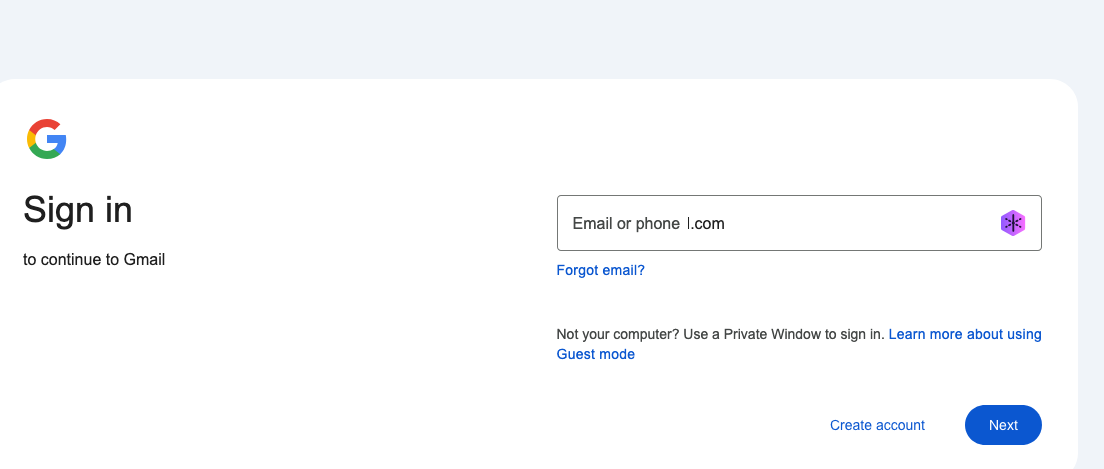
NOW: the password manager fills in my username (my name at gmail.com) and when I hit "NEXT" in the sign in field I get email or phone l.com When I click in the field that disappears and my username appears. When I hit NEXT it goes back to "email or phone l.com". Same when I hit return. Same when I enter my phone number. SO maybe it's Dashlane (my password manager)? But when I disable that and TYPE my username (or phone number) in the field, same stuff happens.
BUT when I use a private browser window, the gmail sign in works as before, and so that's what I've been using -- but it's not convenient having 2 windows open. Before it was just a tab in one window. What changed? Why? Can I change it back? Thanks!
所有回覆 (5)

Geo's Firefox said
(It works ok when I use Private Browsing, but that's inconvenient.)
Sounds like an add-on is the issue.


I've disabled Firefox Relay. The same weird behavior continues. I enter my email on the Google sign in page and when I click next it (my email address) is replaced with "email or phone 1.com".
My login works fine with safari, so it must be a firefox thing. I may have to try other browsers (with privacy-aware features)
Thanks to those who read and commented