Cannot add separate profiles to MacOS dock
I created multiple profiles with the new [management] feature. Amazing, I've been waiting for it for years!
If I open all my profiles I can distinguish them since they all have a different icon. I can also pin all the profiles (Keep in Dock) to the MacOS dock.
When I quit all Firefox instances, I would like to be able to immediately jump back to the desired profile.
Instead I get multiple Firefox icons (without the icon profile, that disappear after I quit Firefox). I find this inconvenient.
所有回覆 (3)
Until I keep both Firefox instances that's the behavior. I believe it's the one I feel the most near to my expectations

When I quit the Firefox instances, I get multiple identical icons. If I keep opening profiles and add them to the dock the situation gets worse.
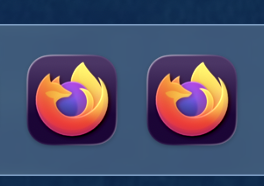

With all the Firefox instances closed, If I click on any of the icons I have on the dock, always the first one is opened and associated to a new Firefox session (which ask me for the profile selection).
If I click again on the other icons in the dock, nothing happens: that's probable the most unexpected behavior 🤔