Thunderbird stops downloading from Pop3 account in the middle of the process, and doesn't delete messages from the server.

Hi,
Thunderbird 140.5.0esr started acting weird with my Pop3 account. Normally it downloads all the messages (300-500 daily) and then deletes them from the server, as expected. However, during the last few months I have experienced 3 issues. In all, TB starts the downloading, than pauses at some point (like "Downloading 189 of 291") then ends the downloading process. At that point I have some of the downloaded messages in my Inbox, and ALL of the messages are at the server too. If I restart the downloading again, I end up with duplicate messages in my Inbox, and all the messages still at the server.
I, than, have to identify which messages have been downloaded, delete them from the server manually (with IMAP client) and start the downloading process on TB again, and this goes on until all messages are downloaded.
Any suggestions ? How can I troubleshoot this issue ?
Regards.
所有回覆 (1)
re :delete them from the server manually (with IMAP client) Are you saying you also have a mail account for same email address set up to use IMAP protocol? That sounds a bit odd since you are using a Pop account with set up to delete on download. Maybe you mean you are viewing the webmail account directly via a browser ?
What OS are you using ?
Do you have an Anti-Virus which is allowed to scan anything you download and any file that gets opened ?
What server are you talking about eg: gmail ?
Have you compacted the 'Inbox' folder recently? It might contain a load of 'marked as deleted' and 'hidden' emails. When you delete or move any email from eg: Inbox, the original is still in the file just marked as deleted. You would need to compact the folder in order to clean it up and remove all the old data. Important to keep files maintained as it reduces the risk of file corruption. It also reduces the file size. So basically anything you had deleted or moved would be communicated to server as fully deleted.
Maybe you have a program designed to 'clean up' what it determines as temp files, eg: CCleaner, WiseCleaner or even many Anti-Virus products can also do it.
I would advise that you do not want any Anti-Virus or software cleanup programs accessing your Thunderbird profile folders as they can cause havoc, nuisance issues or even loss of data.
Even if the Anti-Virus found something, you do not want it to do an auto fix or any fix because AV's do not understand that a single mbox text file may contain loads of emails. So a fix can end up with a complete loss of data in that file. In your case, as emails are deleted off server, it could a bit of a disaster.
Access Anti-Virus products and set up a folder exemption to not scan your 'Thunderbird' profile folder - it will also not scan any of it's contents eg:
- C:Users/username/Appdata/Roaming/Thunderbird
When you download emails to a Pop account, the mail account keeps a record of what has been downloaded in a 'popstate.dat' file.
If that 'popstate.dat' file is corrupted or a new one keeps being created because something is deleting it, then Thunderbird does not know what has been downloaded, so it auto downloads whatever is in the 'Inbox' on server.
The best option is to do the following. I'm assuming you are using Windows OS and also that you downloaded/installed Thunderbird from the official website and not via Windows App Store as Windows puts profiles in a completely different location.
- Exit Thunderbird - this is important
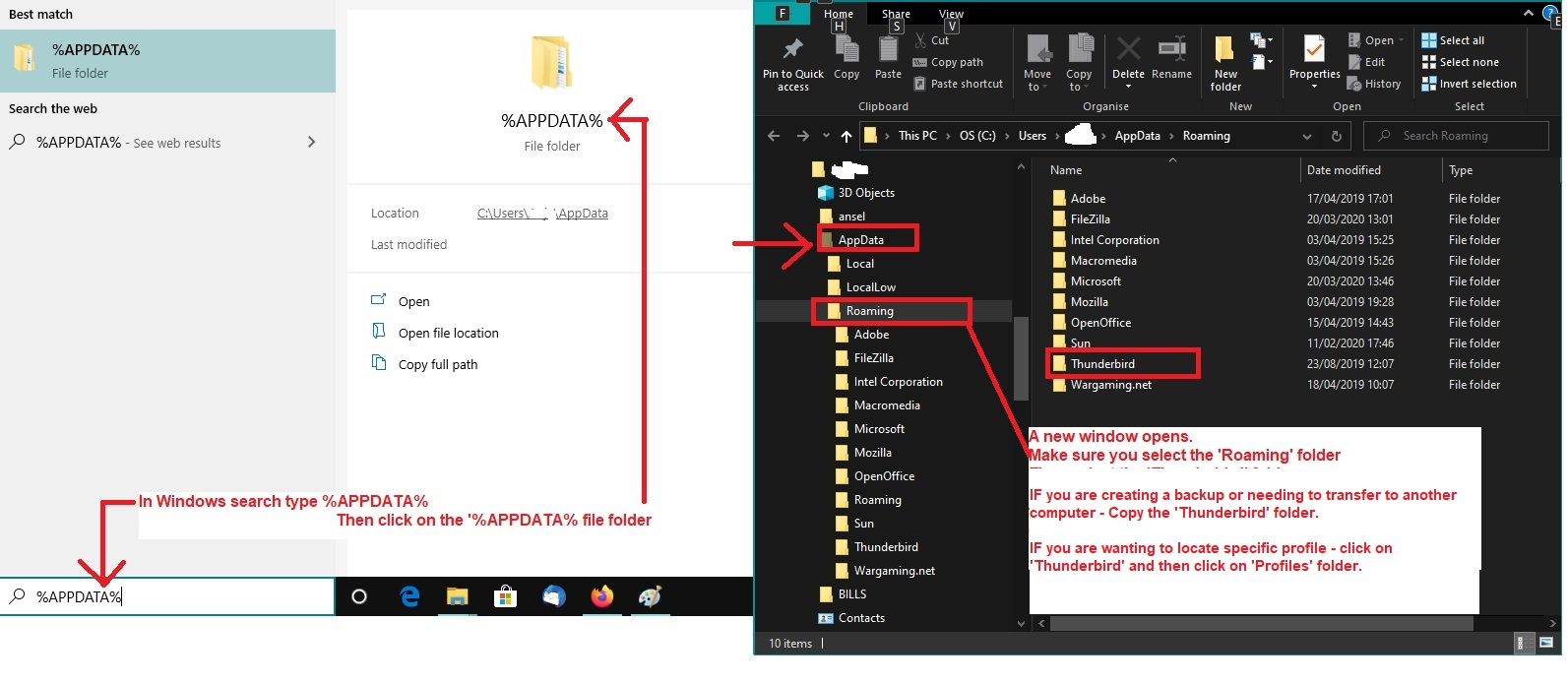
to Access Profile do this: - see image below as a guide
- In windows search type : %Appdata%
- Select the %Appdata% fle folder
- Select 'Roaming' folder
- Select 'Thunderbird' folder
- Select the <profile name> folder
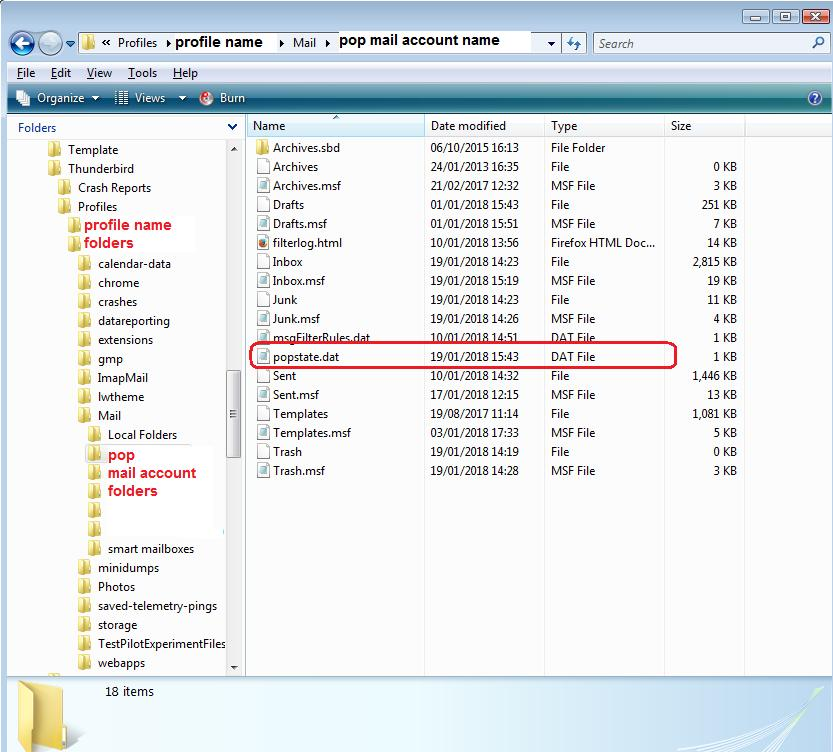
- Select the 'Mail' folder
- Select the <pop mail account name> folder
the pop mail account name folder should contain the 'popstate.dat' file. I've added an image showing an example of pop account. Do you see other popstate.dat files maybe with a number ?
Delete the 'popstate.dat' file because it's unknown if it is corrupted. When you restart Thunderbird, a new one gets created. The downside is that it will download everything again, but it should only do it the once.
It would also be useful if you could post an image that showed your Pop account Server settings - you can cover up the User name = email address as only that part is not required and it's private.
That would tell us the server and all your set up such as what you had selected eg:
- Not selected/ unchecked: 'Leave messages on server'