


Windows 10 reached EOS (end of support) on October 14, 2025. For more information, see this article.

搜尋 Mozilla 技術支援網站

防止技術支援詐騙。我們絕對不會要求您撥打電話或發送簡訊,或是提供個人資訊。請用「回報濫用」功能回報可疑的行為。

了解更多

I have no ''About Firefox'' anymore! HELP!

更多選項

(If any relevance, I'm on Macos 12 Monterey) 'Installation and updates' seemed the nearest topic due to the 'update' part of it, since this seems to only have been happening since this version, or I have simply not noticed due to not having needed to know. But if you look at my two screenshots, you will see the issue. There simply is no About Firefox on my firefox. Neither directly listed on the menu, nor as part of the 'help' sub menu.

Is there, for the sake of learning, a simple fix, so that I donlt have to uninstall/re-install? or an 'about config' type fix? Screenshot 1 shows the menu Screenshot 2 shows help sub-menu As you can see, absolutely no About Firefox

And, only potential issue may be, as you'll see from the share data upload is that I've a lot of tabs open, as I've got a lot to get through toniught, and tomorrow. So, maybe, t=though doubtfully, it is because it isn't handling the tabs and this caused a menu entry to be missing? Surely not likely.
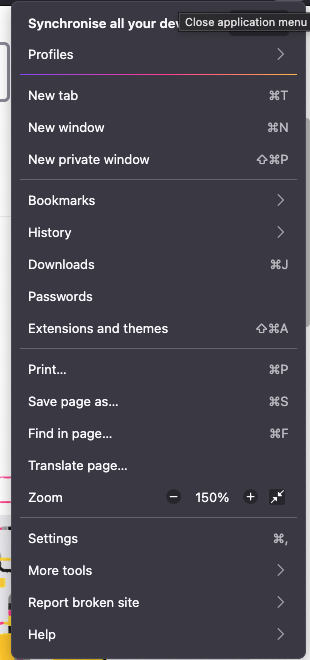
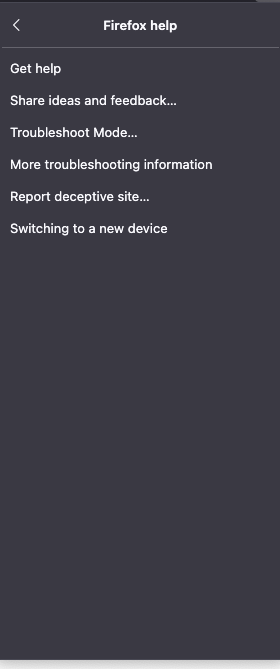
(If any relevance, I'm on Macos 12 Monterey) 'Installation and updates' seemed the nearest topic due to the 'update' part of it, since this seems to only have been happening since this version, or I have simply not noticed due to not having needed to know. But if you look at my two screenshots, you will see the issue. There simply is no ''About Firefox'' on my firefox. Neither directly listed on the menu, nor as part of the 'help' sub menu. Is there, for the sake of learning, a simple fix, so that I donlt have to uninstall/re-install? or an 'about config' type fix? Screenshot 1 shows the menu Screenshot 2 shows help sub-menu As you can see, absolutely no ''About Firefox'' And, only potential issue may be, as you'll see from the ''share data'' upload is that I've a lot of tabs open, as I've got a lot to get through toniught, and tomorrow. So, maybe, t=though doubtfully, it is because it isn't handling the tabs and this caused a menu entry to be missing? Surely not likely.
附加的畫面擷圖

被選擇的解決方法

Oh dear! In case anyone else gets this problem, I found my own cure. there was nothing wrong! I forgot I was on my Mac, of course. And not my Win10 laptop. So I don't go to the three striped menu list.

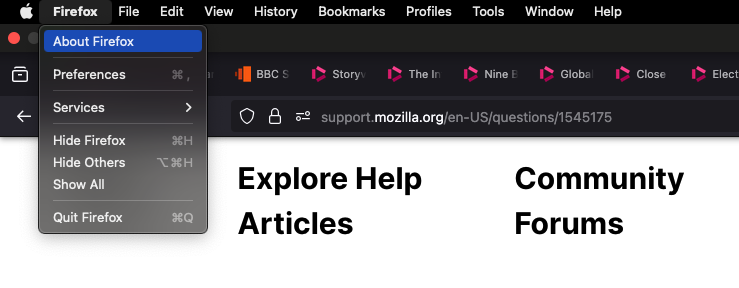
I go to top right of monitor, hover cursor till I see the Apple button, and beside that Firefox, Then see 'About Firefox

What a dumb error. But one I am sure someone will fall into like myself and need an answer for, unless they get that sinking feeling like myself in realization of the truth. Nothing was wrong wioth Firefox. It was me that was broken.
從原來的回覆中察看解決方案 👍 0

所有回覆 (2)

更多選項

選擇的解決方法

Oh dear! In case anyone else gets this problem, I found my own cure. there was nothing wrong! I forgot I was on my Mac, of course. And not my Win10 laptop. So I don't go to the three striped menu list.

I go to top right of monitor, hover cursor till I see the Apple button, and beside that Firefox, Then see 'About Firefox

What a dumb error. But one I am sure someone will fall into like myself and need an answer for, unless they get that sinking feeling like myself in realization of the truth. Nothing was wrong wioth Firefox. It was me that was broken.

更多選項

In case you are using the support articles on this site, they adapt to your current OS. In order to switch the OS, there is a selector in the right column of the article.

問個問題

如果您還沒有帳號,您必須先登入帳號 來回覆文章。還沒有帳號的話,只能發問新問題