Windows 10 reached EOS (end of support) on October 14, 2025. If you are on Windows 10, see this article.

搜尋 Mozilla 技術支援網站

防止技術支援詐騙。我們絕對不會要求您撥打電話或發送簡訊,或是提供個人資訊。請用「回報濫用」功能回報可疑的行為。

了解更多
已解決 封存

Thunderbird (macOS) - unify pop3 and imap accounts

ronfouchier replied
ronfouchier

Hello there,

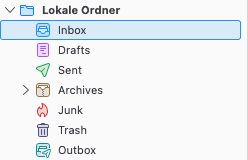
I am using Thunderbird 128.11.1esr on macOS Ventura 13.7.6 (OCLP) and would like to have all my accounts displayed in one unified inbox:

https://assets-prod.sumo.prod.webservices.mozgcp.net/media/uploads/images/2025-06-16-23-42-32-0314df.png

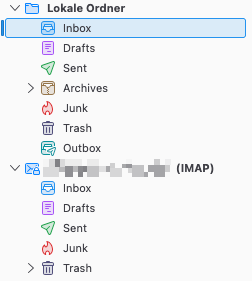
In the past all my accounts relied on pop3, but now of them changed to imap only, which now shows up like this:

https://assets-prod.sumo.prod.webservices.mozgcp.net/media/uploads/images/2025-06-16-23-43-14-1d6721.png

Is there a way for me to have just one inbox folder? I set it up like this ages ago but can't recall which steps need to be taken to receive the desired view.

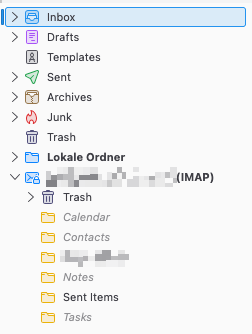
If I choose View > Folders > Unified folders I get this:

https://assets-prod.sumo.prod.webservices.mozgcp.net/media/uploads/images/2025-06-16-23-45-37-4f8cd1.png

Thanks in advance!

Hello there, I am using Thunderbird 128.11.1esr on macOS Ventura 13.7.6 (OCLP) and would like to have all my accounts displayed in one unified inbox: https://assets-prod.sumo.prod.webservices.mozgcp.net/media/uploads/images/2025-06-16-23-42-32-0314df.png In the past all my accounts relied on pop3, but now of them changed to imap only, which now shows up like this: https://assets-prod.sumo.prod.webservices.mozgcp.net/media/uploads/images/2025-06-16-23-43-14-1d6721.png Is there a way for me to have just one inbox folder? I set it up like this ages ago but can't recall which steps need to be taken to receive the desired view. If I choose View > Folders > Unified folders I get this: https://assets-prod.sumo.prod.webservices.mozgcp.net/media/uploads/images/2025-06-16-23-45-37-4f8cd1.png Thanks in advance!
附加的畫面擷圖

所有回覆 (2)

選擇的解決方法

ronfouchier said

In the past all my accounts relied on pop3, but now of them changed to imap only, which now shows up like this: Is there a way for me to have just one inbox folder? If I choose View > Folders > Unified folders I get this:

You had used the "Global Inbox (Local Folders)" for your POP accounts before. This feature only works with POP accounts, not with IMAP accounts. To unify your IMAP accounts your only choice is "Unified Folders". This feature unifies ALL folders, not only the Inbox folders
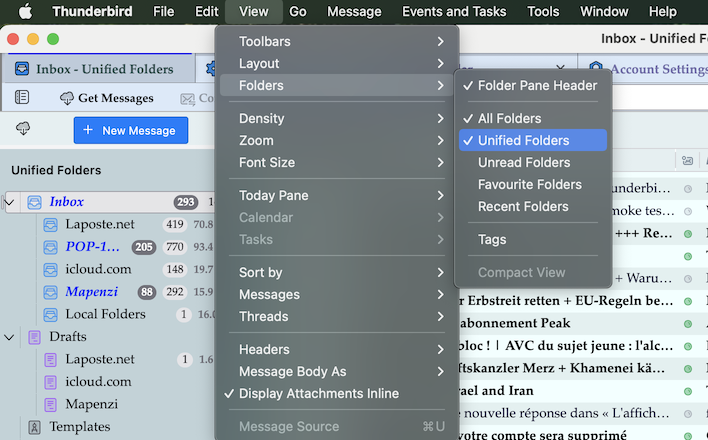
Perfect, thank you very much @mapenzi :).