Firefox will not route audio to the 3.5 mm jack on my desktop (Lenovo ThinkCentre M720e SFF).

This issue came up in early April 2025.
Programs other than Firefox (e.g. Edge, Media Player) behave normally: when playing sound, if nothing is plugged into the 3.5 mm jack, the sound comes from the desktop's external speakers; and when an audio device (speakers or headphones) is plugged into the 3.5 mm jack, the sound instead comes from that device.
Where as Firefox will play using the internal speakers as expected, but when a device is plugged into the 3.5 mm jack, no sound signal goes to that device.
It seems then that the hardware is okay, and the problem must lie within Firefox, or within a Windows setting that is very specific to Firefox.
The sudden onset earlier this month may point to either a Firefox update, or (less likely) a Windows update.
所有回覆 (2)
Correction: second paragraph, first sentence, I intended to say "internal speakers", not "external speakers".

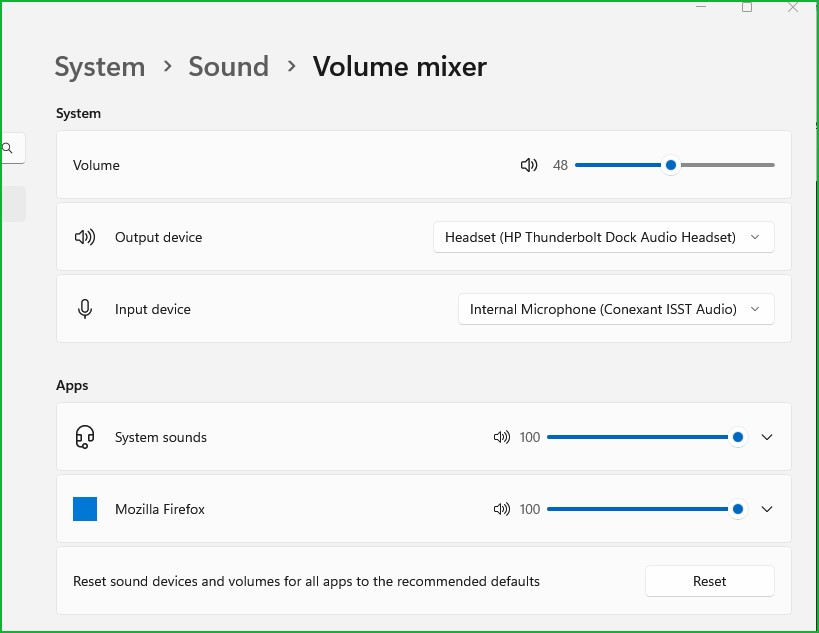
The OS handles the sound routing. What OS? If windows, check you audio settings. see screenshot