


LinkedIn "read more" feature not working anymore since last Firefox update

Hi Everyone,
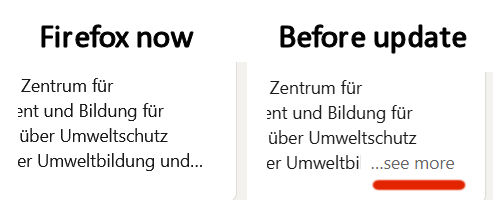
ever since the latest Firefox update, the "read more" feature on LinkedIn pages (personal pages, not the feed) does not show up anymore, at least not for me - the feature allows you to expand the various subsections to read their full content.
I opened LinkedIn on Chrome and Edge to see if it is indeed a browser issue, and it's working fine over there. I also did some troubleshooting (refreshing, clearing cache), but to no avail.
Does anybody else have the same problem?
Thank you!
Via W
所有回覆 (8)
Apologies - the function is called "SEE more" rather than "read more". The affected Firefox update is 133.0 - no issues with prior versions.
Okay, I see. The feed is okay but profile sections are not. Strangely, the button is there in the HTML, but for some reason is invisible and unclickable (attachment). I already crashed Firefox trying to search through 11,000+ style rules, so I'm going to pause investigation.
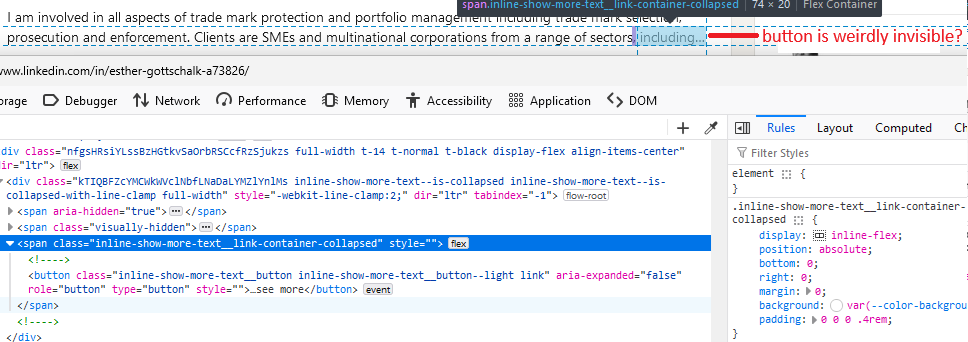
I also brought this up with LinkedIn and they recommended not to use Firefox. Not good.
That's lazy of them, but sadly, not uncommon in an era of tightened budgets for website development and maintenance.
Has anyone found a solution to this annoying problem? Problem is still present. Using Firefox Dev edition 134.0b10.
This should be fixed in Firefox 134, which is scheduled to be released January 7th.
According to the bug report (#1936267), LinkedIn actually is relying on a broken behavior, and the web standard specification says the button shouldn't be rendered. It seems Mozilla has bent its typical stubborn adherence to standards in this case.

Thank you @jscher2000 I am suffering with Firefox and Linkedin too: https://support.mozilla.org/en-US/questions/1482024 Will wait for Mozilla's release on Firefox 134 on January 7th, 2025.
Thank you, @jscher2000 - it's working again. :)