


Need Server Setting

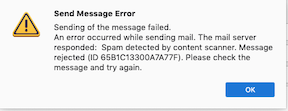
T/B stopped working and I called my Internet provider, Optimum. Together we verified that it wasn't them and suggested I uninstall and then download a fresh version of T/B. Now I'm really in trouble. I can't find my server settings cheat sheet, so I'm not sure of the names of my server, port number, incoming and outgoing. The Optimum person sent me an email which I got and I was able to send it back to them. I then tried to send another email and got the following error message. "Error sending message. The Mailserver responded: Spam detected by content scanner" Thanks, Gary
T/B stopped working and I called my Internet provider, Optimum. Together we verified that it wasn't them and suggested I uninstall and then download a fresh version of T/B. Now I'm really in trouble. I can't find my server settings cheat sheet, so I'm not sure of the names of my server, port number, incoming and outgoing. The Optimum person sent me an email which I got and I was able to send it back to them. I then tried to send another email and got the following error message. "Error sending message. The Mailserver responded: Spam detected by content scanner"
Thanks,
Gary
所有回覆 (1)
Try mail.optimum.net on 995 (POP) or 993 (IMAP), SSL/TLS, normal password, email address for User Name. Same for outgoing smtp except port 465.