


Removing the ⌘+J shortcut
I am trying to change the keyboard shortcut of the Tools → Downloads menu (opening up the downloads).
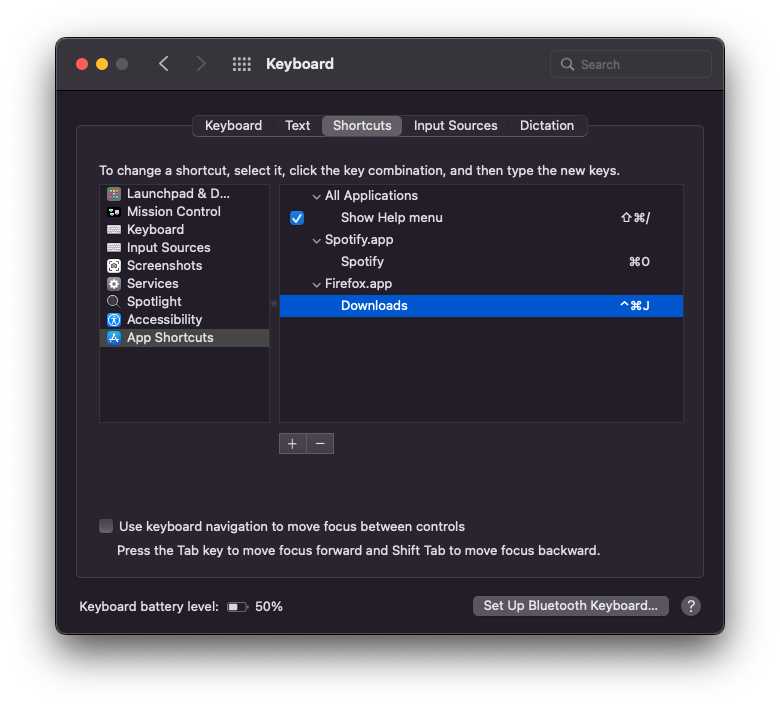
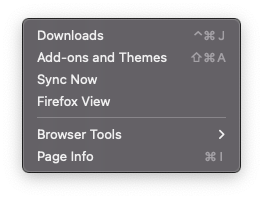
I accidentally click that sometimes and it is quite annoying, so I thought I'll switch the shortcuts to a more complex one to avoid these mistakes ^+⌘+J and when I remap that in the Keyboard preferences, the new shortcuts shows up in the menu, and it starts working but the old shortcut ⌘+J is still working.
I believe that is a bug in Firefox.
被選擇的解決方法
I am a Windows user, so I can't test this and can only give you my interpretation based on what I see. Your Mac has a new system level mapping for
^+⌘+J => Downloads
which is a duplicate of what ⌘+J already does.
⌘+J is not affected by creating a duplicate mapping.
從原來的回覆中察看解決方案 👍 1所有回覆 (11)
Or, to say that differently, you created a new shortcut in your keyboard software, but you did NOT block the ⌘+J shortcut from passing through to Firefox. Maybe that is also possible in your keyboard software?
Dropa said
Firefox has standard defaults hotkeys for the keyboard and those can't be changed unless one uses a 3rd party app to change those settings. https://support.mozilla.org/en-US/kb/keyboard-shortcuts-firefox-ios
That article is for Firefox for iOS (iPhone/iPad) as the article for (desktop) Firefox for macOS it is https://support.mozilla.org/en-US/kb/keyboard-shortcuts-perform-firefox-tasks-quickly
jscher2000 - Support Volunteer said
Or, to say that differently, you created a new shortcut in your keyboard software, but you did NOT block the ⌘+J shortcut from passing through to Firefox. Maybe that is also possible in your keyboard software?
AFAIK under macOS the way to "block" the original shortcut is to remap that to something else.
Dropa said
Firefox has standard defaults hotkeys for the keyboard and those can't be changed unless one uses a 3rd party app to change those settings. https://support.mozilla.org/en-US/kb/keyboard-shortcuts-firefox-ios
This is kind of disappointing, since then Firefox is not working the same way as regular macOS apps. :(
István Karaszi said
jscher2000 - Support Volunteer said
Or, to say that differently, you created a new shortcut in your keyboard software, but you did NOT block the ⌘+J shortcut from passing through to Firefox. Maybe that is also possible in your keyboard software?AFAIK under macOS the way to "block" the original shortcut is to remap that to something else.
I'm not sure I'm reading it correctly, but it doesn't look to me like you remapped the ⌘+J shortcut to something else. What do you want ⌘+J to do instead of opening Downloads? Can you remap ⌘+J to Shift+J or whatever you want Firefox to receive when you press that combination accidentally?
jscher2000 - Support Volunteer said
I'm not sure I'm reading it correctly, but it doesn't look to me like you remapped the ⌘+J shortcut to something else. What do you want ⌘+J to do instead of opening Downloads? Can you remap ⌘+J to Shift+J or whatever you want Firefox to receive when you press that combination accidentally?
I've attached two screenshots that proves that I remapped the ⌘+J to ^+⌘+J to avoid th accidental Downloads tool opening.
As you can see from the second screenshot that the mapping went through and the new shortcut to open Downloads is the assigned ^+⌘+J, but the ⌘+J still works for some reason.
由 István Karaszi 於 修改
jscher2000 - Support Volunteer said
Can you remap ⌘+J to Shift+J or whatever you want Firefox to receive when you press that combination accidentally?
No really, I don't want to have anything on ⌘+J.
選擇的解決方法
I am a Windows user, so I can't test this and can only give you my interpretation based on what I see. Your Mac has a new system level mapping for
^+⌘+J => Downloads
which is a duplicate of what ⌘+J already does.
⌘+J is not affected by creating a duplicate mapping.
jscher2000 - Support Volunteer said
I am a Windows user, so I can't test this and can only give you my interpretation based on what I see.
You are actually right. I just thought that assigning a new shortcut would disable the previous, but that is not the case and the previous shortcut keeps working in other applications as well. That is a bummer!
由 István Karaszi 於 修改
István Karaszi said
You are actually right. I just thought that assigning a new shortcut would disable the previous, but that is not the case and the previous shortcut keeps working in other applications as well. That is a bummer!
Actually, I am not completely stupid. Apple changed the behavior, it worked like that before.
Thank you for the video reference. You might add a comment asking how to make it work in Firefox and see whether he knows a trick for that.