


reinstalling firefox isn't working

I added the Mozilla VPN but that wouldn't communicate with my printer. So out of frustration, I uninstalled firefox all together. I then went to the mozilla site (on Edge) and downloaded the app. It completed the installation but when the browser opens it doesn't do anything. I can't move around or open any sites. It's just frozen on New Tab and nothing works. I can't even sign in - I can click on the sign in button but it doesn't do anything.
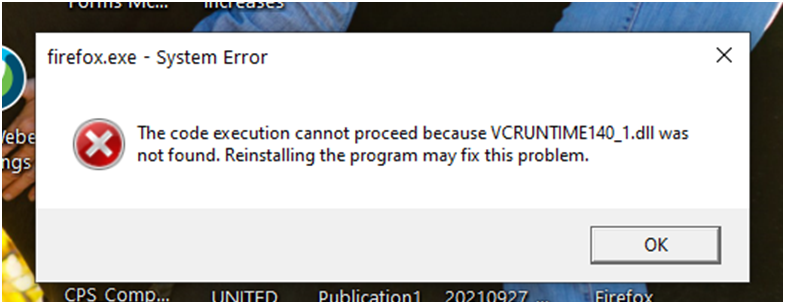
When I tried downloading the app from chrome, I got the attached text box and the same general result. Firefox opened but didn't work.
I've spent hours today trying to just get the regular browser working (forget about the VPN) and I'm frustrated. I have yet to find a way to call a support desk who can help me in "real time".
Thank you to anyone who can solve this for me and get me back to working in Firefox again (and able to print). Katie
被選擇的解決方法
Aha! Sometimes program installers and uninstallers mess with certain shared Microsoft files, triggering a message related to a missing VCRUNTIME140_1.DLL file. That can cripple Firefox from the address bar down.
To fix that issue, you can (re)run Microsoft's installer for the VC Runtime files:
(B) In the "Visual Studio 2015, 2017, 2019, and 2022" section of the article, download the installer for your system:
- 64-bit Windows: the "X64" download
- 32-bit Windows: the "X86" download
(C) Run that installer and restart Windows.
Any improvement?
從原來的回覆中察看解決方案 👍 0所有回覆 (2)
選擇的解決方法
Aha! Sometimes program installers and uninstallers mess with certain shared Microsoft files, triggering a message related to a missing VCRUNTIME140_1.DLL file. That can cripple Firefox from the address bar down.
To fix that issue, you can (re)run Microsoft's installer for the VC Runtime files:
(B) In the "Visual Studio 2015, 2017, 2019, and 2022" section of the article, download the installer for your system:
- 64-bit Windows: the "X64" download
- 32-bit Windows: the "X86" download
(C) Run that installer and restart Windows.
Any improvement?
jscher2000, where have you been all my life??? Perfect answer. Got FF up and running and so easy. Thank you for the clear and concise instructions. All is well with the regular FF. I can do without the VPN as long as I have all of the passwords saved on FF.
Thank you, thank you! Katie