


Letters missing from web pages
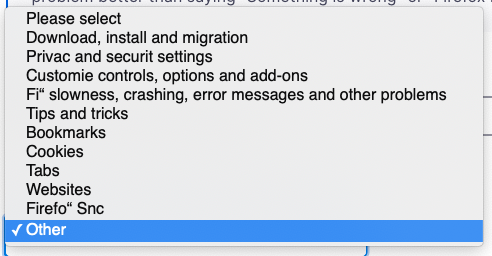
Letters (most noticeably x, y, and z) appear to be missing from text in web pages. Running macOS 10.14.6 with Firefox Browser 80.0. Note the image from the drop down menu on this support page. Missing y's, z's, and x is replaced by quotation marks (ie Firefo" Snc).
I have seen this sporadically on a couple of macs that I own. Text seems okay in Safari.
Thank you for your help!
所有回覆 (4)
選擇的解決方法
Hi this is usually caused by a problem with fonts that aren't working properly or are corrupted.
You can right-click and select "Inspect Element" to open the builtin Inspector with this element selected.
You can check in the Rules tab in the right panel in the Inspector what font-family is used for selected text. You can check in the Font tab in the right panel in the Inspector what font is actually used because Firefox might be using a different font than specified by the website.
- /questions/1268528 when I type the number 9, the underscore symbol appears (long dash)
- /questions/1278708 Text of website https://apod.nasa.gov/apod/ is missing the charakters x, y, z but only in lower case where x is not simply missing but replaced by "
由 cor-el 於 修改
Thank you cor-el! That solved the problem!
cor-el said
For anyone who finds this after Jan 2021, that link is 404. The CURRENT link is: https://developer.mozilla.org/en-US/docs/Tools/Page_Inspector/How_to/Edit_fonts (note the “/docs” between “en-US” and “Tools”)
I have this same problem of not seeing Y-X & Z on my e-mails. However i don't see what the steps are for the solution. Please spell out what I need to do!!!
James
I have the same issue in Firefox...as well as other users of Firefox at office.
Those using Microsoft Edge not experiencing this issue at all.
For me it seems to be the letter G not showing up in Firefox.
Website uses Google fonts, but it's clearly an issue with FF as other browsers have no issues.
